
外观
Pandas
Pandas 是 Python 的一个第三方包,也是商业和工程领域最流行的结构化数据工具集,用于数据清洗,处理以及分析。Pandas 底层是基于 Numpy 构建的,所以运行速度特别的快; 有专门的处理缺失数据的 API,具有强大而灵活的分组,聚合,转换功能。
基本使用
# 导入
import pandas as pd

# 从 CSV 文件读取数据集
df = pd.read_csv("data.csv")
print("查看数据集:", df, sep="\n", end="\n\n")
"""
      year   country           GDP
0     1960        美国  543300000000
1     1960        英国   73233967692
2     1960        法国   62225478000
3     1960        中国   59716467625
4     1960        日本   44307342950
...    ...       ...           ...
9925  2019  圣多美和普林西比     418637388
9926  2019        帕劳     268354919
9927  2019      基里巴斯     194647201
9928  2019        瑙鲁     118223430
9929  2019       图瓦卢      47271463

[9930 rows x 3 columns]
"""

# 查看前五行
print("查看前五行:", df.head(), sep="\n", end="\n\n")
"""
   year country           GDP
0  1960      美国  543300000000
1  1960      英国   73233967692
2  1960      法国   62225478000
3  1960      中国   59716467625
4  1960      日本   44307342950
"""

# 查询中国 GDP
print("查询中国GDP:", df[df["country"] == "中国"].head(10), sep="\n", end="\n\n")
"""
     year country          GDP
3    1960      中国  59716467625
107  1961      中国  50056868957
211  1962      中国  47209359005
316  1963      中国  50706799902
421  1964      中国  59708343488
525  1965      中国  70436266146
639  1966      中国  76720285969
755  1967      中国  72881631326
874  1968      中国  70846535055
993  1969      中国  79705906247
"""

# 将 year 设为索引
new_df = df.set_index("year")
print("将year设为索引:", new_df, sep="\n", end="\n\n")
"""
       country           GDP
year
1960        美国  543300000000
1960        英国   73233967692
1960        法国   62225478000
1960        中国   59716467625
1960        日本   44307342950
...        ...           ...
2019  圣多美和普林西比     418637388
2019        帕劳     268354919
2019      基里巴斯     194647201
2019        瑙鲁     118223430
2019       图瓦卢      47271463

[9930 rows x 2 columns]
"""

# 画出中国和日本的 GDP 折线图
jp_gdp = df[df.country=='日本'].set_index('year') # 按条件选取数据后, 重设索引
jp_gdp.GDP.plot()
china_gdp = df[df.country=='中国'].set_index('year') # 按条件选取数据后, 重设索引
china_gdp.GDP.plot()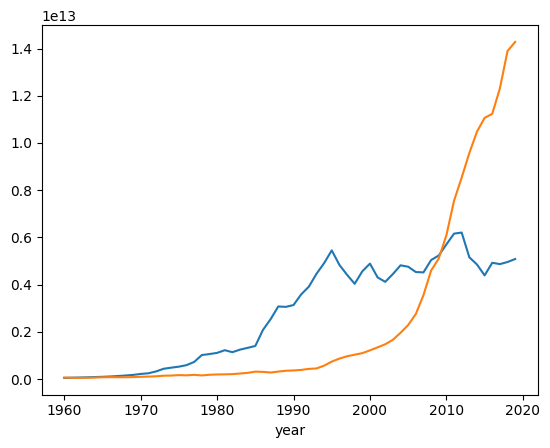
Pandas 数据结构与数据类型
Pandas 最核心的两个数据结构: DataFrame 和 Series。DataFrame 是表对象,Series 是列对象。
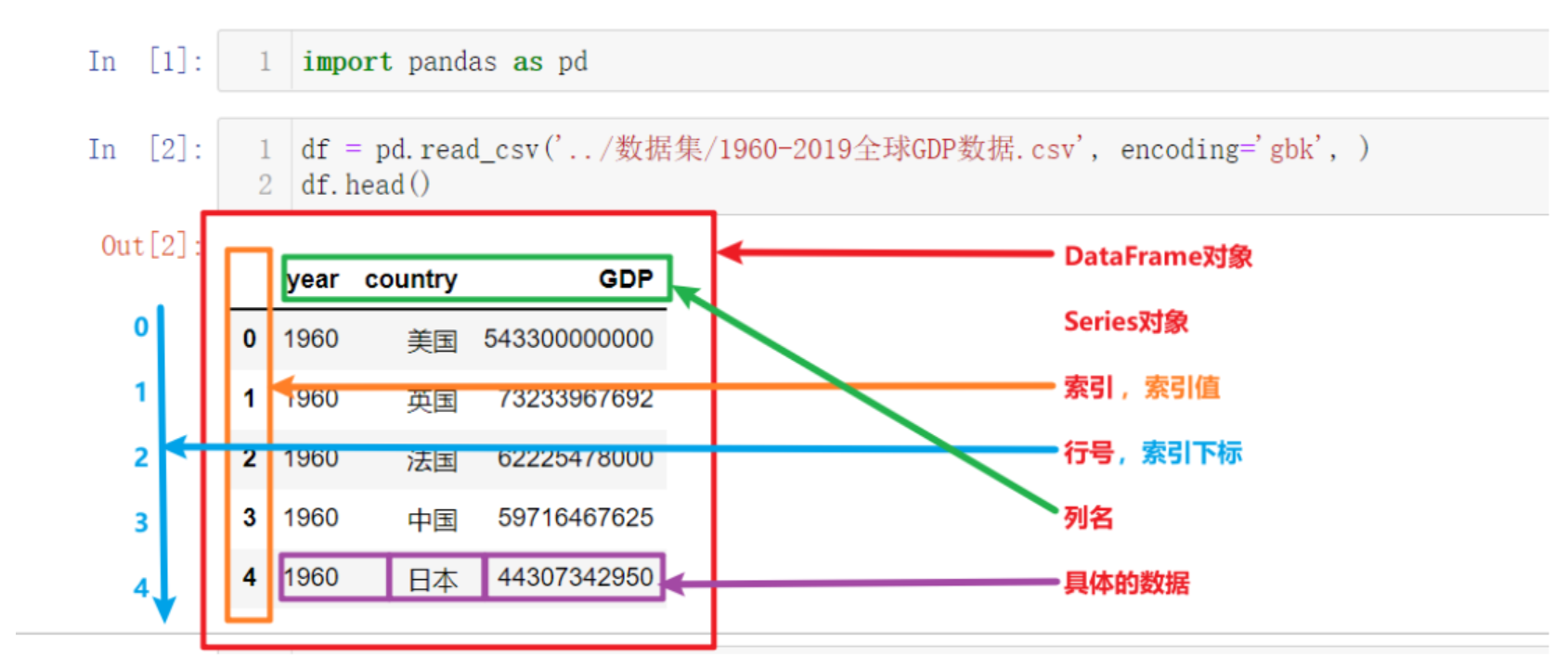
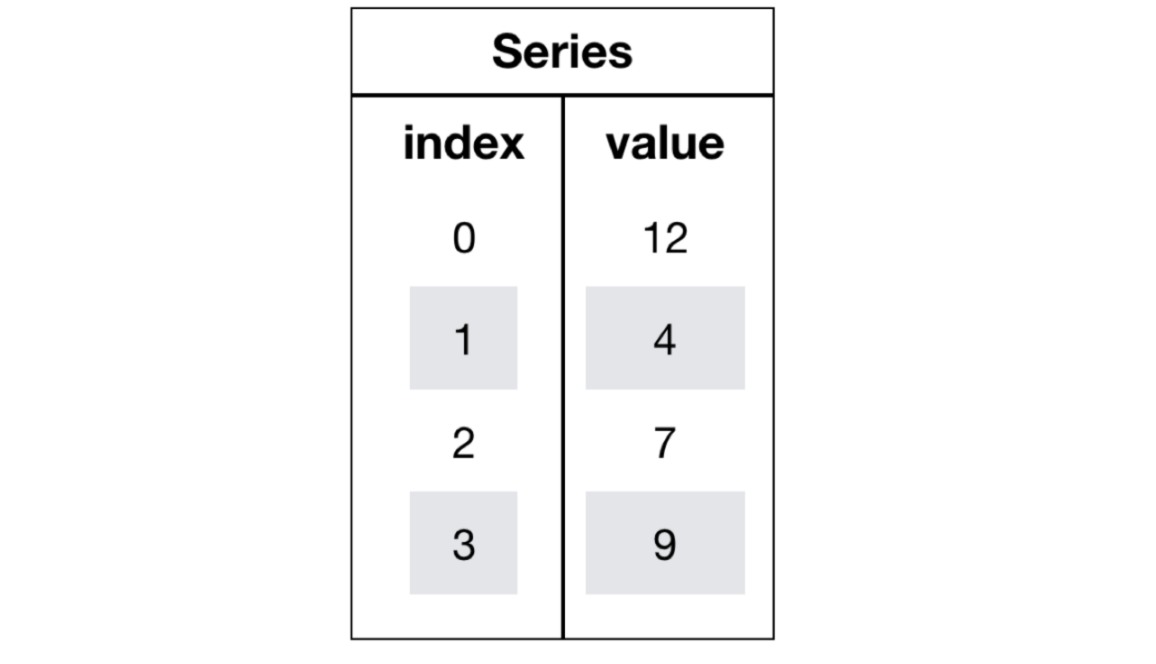
Series 对象
Series = index + values + dtype + name。DataFrame 的一列,本质上就是一个 Series。
创建 Series
通过 Python 原生列表创建,可使用自增索引或使用自定义索引。
demo.py
import pandas as pd

# 使用默认自增索引
series1 = pd.Series([1, 2, 3, 4, 5])
print(series1)

# 自定义索引
series2 = pd.Series([1, 2, 3, 4, 5], index=['a', 'b', 'c', 'd', 'e'])
print(series2)
运行结果.txt
0    1
1    2
2    3
3    4
4    5
dtype: int64
a    1
b    2
c    3
d    4
e    5
dtype: int64
使用字典或元组创建。
demo.py
import pandas as pd

# 使用元组创建
series1 = pd.Series((1, 2, 3, 4, 5))
print(series1)

# 使用字典创建
series2 = pd.Series({
    'a': 1,
    'b': 2,
    'c': 3,
    'd': 4,
    'e': 5
})
print(series2)
运行结果.txt
0    1
1    2
2    3
3    4
4    5
dtype: int64
a    1
b    2
c    3
d    4
e    5
dtype: int64
使用 numpy 创建。
demo.py
import pandas as pd
import numpy as np

ndarray = np.array([1, 2, 3])
print(ndarray)
print(type(ndarray))

series = pd.Series(ndarray)
print(series)
print(type(series))
运行结果.txt
[1 2 3]
<class 'numpy.ndarray'>
0    1
1    2
2    3
dtype: int64
<class 'pandas.Series'>
Series 常用属性
| 属性 | 说明 |
|---|---|
| index | 索引对象 |
| values | 底层数据 (ndarray) |
| dtypes | 数据类型 |
| shape | 形状 (由于是一维, 通常显示为(n,) ) |
| size | 元素个数 |
| ndim | 维度数 (永远是1) |
| name | Series 名称 |
| axes | 轴信息, 等价于 [index] |
| nbytes | 数据占用字节数 |
| flags | 内部标志信息 |
demo.py
import pandas as pd
import numpy as np

ndarray = np.array([1, 2, 3, 4])
series = pd.Series(ndarray)

print(f"索引: {series.index}")
print(f"元素: {series.values}")
print(f"数据类型: {series.dtypes}")
print(f"形状: {series.shape}")
print(f"元素数量: {series.size}")
print(f"维度: {series.ndim}")
print(f"名称: {series.name}")
print(f"轴信息: {series.axes}")
print(f"数据占用字节数: {series.nbytes}")
print(f"内部标志: {series.flags}")
运行结果.txt
索引: RangeIndex(start=0, stop=4, step=1)
元素: [1 2 3 4]
数据类型: int64
形状: (4,)
元素数量: 4
维度: 1
名称: None
轴信息: [RangeIndex(start=0, stop=4, step=1)]
数据占用字节数: 32
内部标志: <Flags(allows_duplicate_labels=True)>
Series 可以通过索引返回数据。
import pandas as pd
import numpy as np

ndarray = np.array(["Apple", "Banana", "Cherry", "Date"])
series = pd.Series(ndarray, index=["a", "b", "c", "d"])

print(series.a) # Apple
print(series["b"]) # Banana
DataFrame 对象
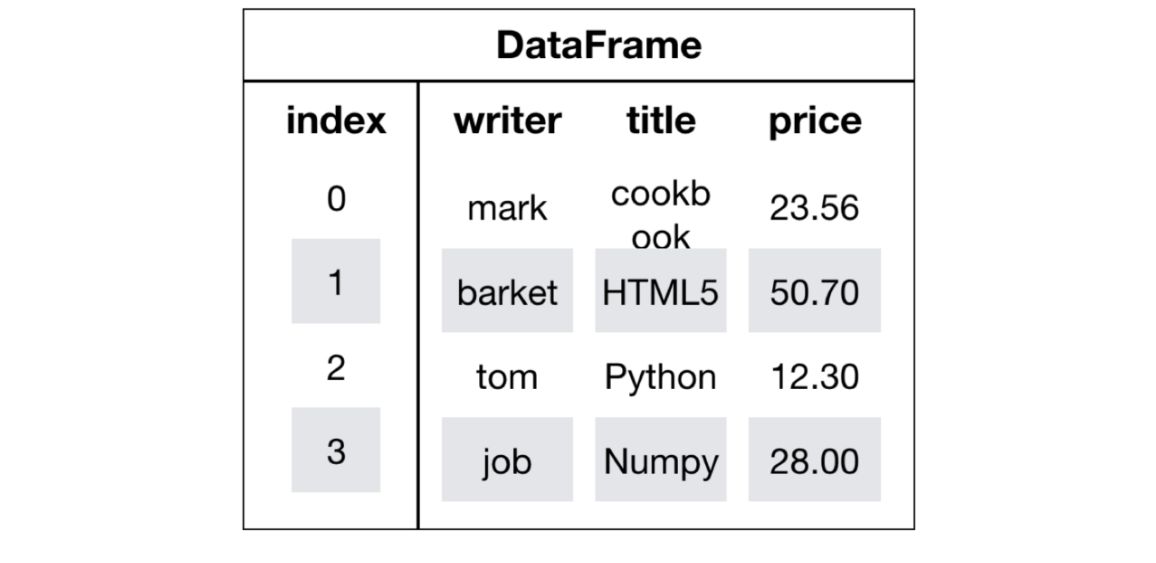
DataFrame 是一个类似于二维数组或表格 (如 Excel) 的对象,既有行索引,又有列索引。
- 行索引,表明不同行,横向索引,叫 index,0 轴,axis = 0
- 列索引,表名不同列,纵向索引,叫 columns,1 轴,axis = 1
创建 DataFrame
使用 pandas.read_csv() 函数。
demo.py
import pandas as pd

df = pd.read_csv("data.csv")
print(df)
print(type(df))
运行结果.txt
      year   country           GDP
0     1960        美国  543300000000
1     1960        英国   73233967692
2     1960        法国   62225478000
3     1960        中国   59716467625
4     1960        日本   44307342950
...    ...       ...           ...
9925  2019  圣多美和普林西比     418637388
9926  2019        帕劳     268354919
9927  2019      基里巴斯     194647201
9928  2019        瑙鲁     118223430
9929  2019       图瓦卢      47271463

[9930 rows x 3 columns]
<class 'pandas.DataFrame'>
使用字典加列表的方式创建。
demo.py
import pandas as pd

df1_data = {
    '日期': ['2021-08-21', '2021-08-22', '2021-08-23'],
    '温度': [25, 26, 50],
    '湿度': [81, 50, 56]
}
df1 = pd.DataFrame(data=df1_data)
print(df1)
运行结果.txt
     日期  温度  湿度
0  2021-08-21  25  81
1  2021-08-22  26  50
2  2021-08-23  50  56
使用列表创建。
demo.py
import pandas as pd

df2_data = [
    ('2021-08-21', 25, 81),
    ('2021-08-22', 26, 50),
    ('2021-08-23', 27, 56)
]

df2 = pd.DataFrame(
    data=df2_data,
    columns=['日期', '温度', '湿度'],
    index = ['row_1','row_2','row_3'] # 手动指定索引
)
print(df2)
运行结果.txt
        日期  温度  湿度
row_1  2021-08-21  25  81
row_2  2021-08-22  26  50
row_3 2021-08-23 27 56- 使用 numpy 创建,这里不再演示。
- 在创建时可指定行索引和列索引。行索引通过 index 参数传入,列索引通过 columns 参数传入。
demo.py
import pandas as pd
import numpy as np

score = np.random.randint(40, 100, (3, 2))
score_df = pd.DataFrame(score, index=["Row1", "Row2", "Row3"], columns=["Column1", "Column2"])
print(score_df)
运行结果.txt
      Column1  Column2
Row1       61       84
Row2       63       74
Row3       86       85
DataFrame 常用属性和方法
| 属性和方法 | 说明 |
|---|---|
| shape | 返回行列数量,格式为 (行数,列数) |
| index | 返回行索引对象 |
| columns | 返回列名 |
| values | 获取值,是一个 numpy 数组 |
| T | 转置 |
| head(n=5) | 获取前 n 行数据 |
| tail(n=5) | 显示后 n 行数据 |
demo.py
import pandas as pd
import numpy as np

score = np.random.randint(40, 100, (5, 3))
score_df = pd.DataFrame(score, index=["Row1", "Row2", "Row3", "Row4", "Row5"], columns=["Column1", "Column2", "Column3"])
print(f"行列数: {score_df.shape}")
print(f"行索引对象: {score_df.index}")
print(f"列索引对象: {score_df.columns}")
print(f"值: {score_df.values}")
print(f"转置: {score_df.T}")
print(f"前三行: {score_df.head(3)}")
print(f"后两行: {score_df.tail(2)}")
运行结果.txt
行列数: (5, 3)
行索引对象: Index(['Row1', 'Row2', 'Row3', 'Row4', 'Row5'], dtype='str')
列索引对象: Index(['Column1', 'Column2', 'Column3'], dtype='str')
值: [[73 80 87]
 [91 59 79]
 [42 80 85]
 [91 41 68]
 [42 69 69]]
转置:          Row1  Row2  Row3  Row4  Row5
Column1    73    91    42    91    42
Column2    80    59    80    41    69
Column3    87    79    85    68    69
前三行:       Column1  Column2  Column3
Row1       73       80       87
Row2       91       59       79
Row3       42       80       85
后两行:       Column1  Column2  Column3
Row4       91       41       68
Row5       42       69       69
Pandas 的数据类型
| Pandas Dtype | 说明 | 典型对应的 Python 类型/备注 |
|---|---|---|
| int64, Int64 | 整数类型 | Python int; 其中 Int64 是可空整数 (允许缺失值 pd.NA) |
| float64/float32/… | 浮点数 | Python float; 缺失值通常为 np.nan |
| bool/boolean | 布尔类型 | Python bool (True/False); boolean 是可空布尔类型, 允许 pd.NA |
| object | 通用 Python 对象 | 任意 Python 对象 (最常见是字符串 str) |
| string | Pandas 专用字符串类型 | Python str 或 pd.NA (比 object 更严格, 更优化) |
| datetime64[ns] | 不带时区的日期时间 | Python datetime.datetime/pd.Timestamp |
| datetime64[ns, tz] | 带时区的日期时间 | Python datetime.datetime (带 tzinfo)/pd.Timestamp |
| timedelta64[ns] | 时间差 | Python datetime.timedelta/pd.Timedelta |
| category | 分类类型 | Python 原生无特定类型, 但可映射为分类标签值 (节省内存) |
| 扩展类型 | 扩展 dtype (不是基本 NumPy dtype) | 说明/对应 Python 类型 |
|---|---|---|
| PeriodDtype | 周期数据 (如年份/月份/季度) | Python pandas.Period |
| IntervalDtype | 区间类型 (数值区间) | Python pandas.Interval |
| SparseDtype | 稀疏数据类型 (节省大量空值内存) | 对应稀疏数组 |
| ArrowDtype (如 string[pyarrow]) | 基于 Apache Arrow 的高效存储 | Python 标量或 pd.NA (实验性/高效内存格式) |
Pandas 基本操作
索引操作
可直接使用行列索引获取某一单元的值 (先列后行)。
demo.py
import pandas as pd
import numpy as np

score = np.random.randint(40, 100, (5, 3))
score_df = pd.DataFrame(score, index=["Row1", "Row2", "Row3", "Row4", "Row5"], columns=["Column1", "Column2", "Column3"])
print(score_df["Column3"])
print(score_df["Column1"]["Row1"])

# 错误的操作: score_df["Row1"]["Column1"]
# 错误的操作: score_df[0][0]
运行结果.txt
Row1    99
Row2    95
Row3    57
Row4    90
Row5    98
Name: Column3, dtype: int32
49
可以结合 loc 或者 iloc 使用索引,使用前者只能使用行列索引,且是先行后列,使用后者可以使用下标。
demo.py
import pandas as pd
import numpy as np

score = np.random.randint(40, 100, (5, 3))
score_df = pd.DataFrame(score, index=["Row1", "Row2", "Row3", "Row4", "Row5"], columns=["Column1", "Column2", "Column3"])

print(score_df.loc["Row1"])
print(score_df.loc["Row1", "Column2"])
print(score_df.loc["Row1":"Row3", "Column2"])

print(score_df.iloc[0])
print(score_df.iloc[0, 1])
print(score_df.iloc[0:3, 1])
运行结果.txt
Column1    69
Column2    45
Column3    72
Name: Row1, dtype: int32
45
Row1    45
Row2    54
Row3    68
Name: Column2, dtype: int32
Column1    69
Column2    45
Column3    72
Name: Row1, dtype: int32
45
Row1    45
Row2    54
Row3    68
Name: Column2, dtype: int32
通过一层索引名,可以修改一整列的值; 不可以通过两层索引,修改某个单元格的值。
demo.py
import pandas as pd
import numpy as np

score = np.random.randint(40, 100, (5, 3))
score_df = pd.DataFrame(score, index=["Row1", "Row2", "Row3", "Row4", "Row5"], columns=["Column1", "Column2", "Column3"])

score_df["Column1"] = 1
print(score_df)

score_df["Column4"] = score_df["Column1"] + score_df["Column2"] + score_df["Column3"]
print(score_df)

# score_df["Column1", "Row1"] = -100  # 错误
# score_df["Column1"]["Row1"] = -100  # 错误
score_df.loc["Row1", "Column1"] = -100
print(score_df)
运行结果.txt
      Column1  Column2  Column3
Row1        1       83       96
Row2        1       87       51
Row3        1       93       80
Row4        1       91       58
Row5        1       83       80
      Column1  Column2  Column3  Column4
Row1        1       83       96      180
Row2        1       87       51      139
Row3        1       93       80      174
Row4        1       91       58      150
Row5        1       83       80      164
      Column1  Column2  Column3  Column4
Row1     -100       83       96      180
Row2        1       87       51      139
Row3        1       93       80      174
Row4        1       91       58      150
Row5        1       83       80      164
修改行索引对象和列索引对象,通过直接给 index 对象和 columns 对象赋值。
demo.py
import pandas as pd
import numpy as np

score = np.random.randint(40, 100, (5, 3))
score_df = pd.DataFrame(score, index=["Row1", "Row2", "Row3", "Row4", "Row5"], columns=["Column1", "Column2", "Column3"])

print(score_df.index)
print(score_df.columns)

score_df.index = ["行1", "行2", "行3", "行4", "行5"]
score_df.columns = ["列A", "列B", "列C"]

print(score_df.index)
print(score_df.columns)
运行结果.txt
Index(['Row1', 'Row2', 'Row3', 'Row4', 'Row5'], dtype='str')
Index(['Column1', 'Column2', 'Column3'], dtype='str')
Index(['行1', '行2', '行3', '行4', '行5'], dtype='str')
Index(['列A', '列B', '列C'], dtype='str')
可以通过 set_index 方法设置行索引。
demo.py
import pandas as pd
import numpy as np

score = np.random.randint(40, 100, (5, 3))
score_df = pd.DataFrame(score, index=["Row1", "Row2", "Row3", "Row4", "Row5"], columns=["Column1", "Column2", "Column3"])

print(score_df)

score_df.set_index("Column1", inplace=True)

print(score_df)
运行结果.txt
      Column1  Column2  Column3
Row1       93       77       79
Row2       95       98       78
Row3       76       69       51
Row4       75       63       83
Row5       95       88       54
         Column2  Column3
Column1
93            77       79
95            98       78
76            69       51
75            63       83
95            88       54
添加删除列
添加列,使用 df["new_col"] = ['value1',...] 的语法即可。
demo.py
import pandas as pd

# 构造一个索引和数据都"故意打乱"的DataFrame
df = pd.DataFrame({
    "姓名": ["张三", "李四", "王五", "赵六"],
    "分数": [88, 92, 75, 92],
    "年龄": [20, 19, 21, 18]
}, index=[3, 1, 4, 2])

print("原始DataFrame: ")
print(df)

df['等级'] = [10, 9, 10, 9]
print("添加新列后的DataFrame: ")
print(df)
运行结果.txt
原始 DataFrame:
   姓名  分数  年龄
3  张三  88  20
1  李四  92  19
4  王五  75  21
2  赵六  92  18
添加新列后的 DataFrame:
   姓名  分数  年龄  等级
3  张三  88  20  10
1  李四  92  19   9
4  王五  75  21  10
2  赵六  92  18   9
删除列,使用 drop 方法删除,可指定按行删除还是按列删除。如果按行删除,需指定 index 参数,如果是按列删除,需指定 columns 参数。
demo.py
import pandas as pd

# 构造一个索引和数据都"故意打乱"的DataFrame
df = pd.DataFrame({
    "姓名": ["张三", "李四", "王五", "赵六"],
    "分数": [88, 92, 75, 92],
    "年龄": [20, 19, 21, 18]
}, index=[3, 1, 4, 2])

print("原始DataFrame: ")
print(df)

df['等级'] = [10, 9, 10, 9]
print("添加新列后的DataFrame: ")
print(df)

df.drop(columns=['等级'], inplace=True)
print("删除等级列后的DataFrame: ")
print(df)
运行结果.txt
原始 DataFrame:
   姓名  分数  年龄
3  张三  88  20
1  李四  92  19
4  王五  75  21
2  赵六  92  18
添加新列后的 DataFrame:
   姓名  分数  年龄  等级
3  张三  88  20  10
1  李四  92  19   9
4  王五  75  21  10
2  赵六  92  18   9
删除等级列后的 DataFrame:
   姓名  分数  年龄
3  张三  88  20
1  李四  92  19
4  王五  75  21
2  赵六  92  18
排序操作
df.sort_index(): 用索引排序。
demo.py
import pandas as pd

data = {
    "姓名": ["张三", "李四", "王五"],
    "分数": [88, 92, 75]
}

df = pd.DataFrame(data, index=[3, 1, 2])

print("原始DataFrame: ")
print(df)

df_sorted = df.sort_index()

print("\n按索引排序后: ")
print(df_sorted)
运行结果.txt
原始 DataFrame:
   姓名  分数
3  张三  88
1  李四  92
2  王五  75

按索引排序后:
   姓名  分数
1  李四  92
2  王五  75
3  张三  88
df.sort_index(by, axis=0, ascending=True, inplace=False): 通过 by 参数指定排序列,ascending 代表是否升序,如果是多列,就用列表指定每一列的顺序,inplace 代表是否替换源对象。
demo.py
import pandas as pd

df = pd.DataFrame({
    "姓名": ["张三", "李四", "王五", "赵六"],
    "分数": [88, 92, 75, 92],
    "年龄": [20, 19, 21, 18]
}, index=[3, 1, 4, 2])

print("原始DataFrame: ")
print(df)

# ======================
# 按索引排序
# ======================
df_by_index = df.sort_index()

print("\n按索引排序 sort_index(): ")
print(df_by_index)

# ======================
# 按单列值排序
# ======================
df_by_score = df.sort_values(by="分数")

print("\n按分数排序 sort_values(by='分数'): ")
print(df_by_score)

# ======================
# 按多列值排序
# ======================
df_multi = df.sort_values(
    by=["分数", "年龄"],
    ascending=[False, True]
)

print("\n先按分数降序, 再按年龄升序: ")
print(df_multi)
运行结果.txt
原始 DataFrame:
   姓名  分数  年龄
3  张三  88  20
1  李四  92  19
4  王五  75  21
2  赵六  92  18

按索引排序 sort_index():
   姓名  分数  年龄
1  李四  92  19
2  赵六  92  18
3  张三  88  20
4  王五  75  21

按分数排序 sort_values(by='分数'):
   姓名  分数  年龄
4  王五  75  21
3  张三  88  20
1  李四  92  19
2  赵六  92  18

先按分数降序,再按年龄升序:
   姓名  分数  年龄
2  赵六  92  18
1  李四  92  19
3  张三  88  20
4  王五  75  21
df.rank(axis=0, numeric_only=False, method='average', na_option='keep', ascending=True, pct=False): 用列值排序, 默认是升序。
axis: 默认是按行排序,如果是按列排序,则将 axis 设置为 1。numeric_only: 默认是 True,表示只对数字列排序,如果是 False,则对所有列排序。method: 默认是 average,表示平均值排序。'average': 平均值排序,相同值的排名取平均值。'min': 最小值排序,相同值的排名取最小值。'max': 最大值排序,相同值的排名取最大值。'dense': 排名一致,数值相同的评分一致。
na_option: 默认是 keep,表示保留缺失值。'keep': NaN 值保留原有位置。'top': NaN 值放在前面。'bottom': NaN 值放在后面。
ascending: 默认是 True,表示升序排序。pct: 默认是 False,表示不返回百分比排名。
获取 DataFrame 信息
describe()函数用于获取 DataFrame 每列的最小值,最大值,平均值,中位数,方差,标准差等信息。info()函数用于描述 DataFrame 的信息。
demo.py
import pandas as pd

# 构造一个索引和数据都"故意打乱"的DataFrame
df = pd.DataFrame({
    "姓名": ["张三", "李四", "王五", "赵六"],
    "分数": [88, 92, 75, 92],
    "年龄": [20, 19, 21, 18]
}, index=[3, 1, 4, 2])

print(df.describe())
df.info()
运行结果.txt
              分数         年龄
count   4.000000   4.000000
mean   86.750000  19.500000
std     8.057088   1.290994
min    75.000000  18.000000
25%    84.750000  18.750000
50%    90.000000  19.500000
75%    92.000000  20.250000
max    92.000000  21.000000
<class 'pandas.DataFrame'>
Index: 4 entries, 3 to 2
Data columns (total 3 columns):
 #   Column  Non-Null Count  Dtype
---  ------  --------------  -----
 0   姓名      4 non-null      str
 1   分数      4 non-null      int64
 2   年龄      4 non-null      int64
dtypes: int64(2), str(1)
memory usage: 128.0 bytes
Pandas 的运算
Pandas 的加减乘除
Pandas 可直接使用 Python 原生运算符计算,适用于 DataFrame 和 Series,也可使用 add,sub 等方法。
demo.py
import pandas as pd

df1 = pd.DataFrame({
    "Col1": [1, 2, 3, 4, 5],
    "Col2": [6, 7, 8, 9, 10],
    "Col3": [11, 12, 13, 14, 15]
})
df2 = pd.DataFrame({
    "Col1": [16, 17, 18, 19, 20],
    "Col2": [21, 22, 23, 24, 25],
    "Col3": [26, 27, 28, 29, 30]
})
print(f"df1.add(df2) = \n{df1.add(df2)}")
print(f"df1 + df2 = \n{df1 + df2}")

print(f"df1.sub(df2) = \n{df1.sub(df2)}")
print(f"df1 - df2 = \n{df1 - df2}")

print(f"df1.mul(df2) = \n{df1.mul(df2)}")
print(f"df1 * df2 = \n{df1 * df2}")

print(f"df1.div(df2) = \n{df1.div(df2)}")
print(f"df1 / df2 = \n{df1 / df2}")
运行结果.txt
df1.add(df2) =
   Col1  Col2  Col3
0    17    27    37
1    19    29    39
2    21    31    41
3    23    33    43
4    25    35    45
df1 + df2 =
   Col1  Col2  Col3
0    17    27    37
1    19    29    39
2    21    31    41
3    23    33    43
4    25    35    45
df1.sub(df2) =
   Col1  Col2  Col3
0   -15   -15   -15
1   -15   -15   -15
2   -15   -15   -15
3   -15   -15   -15
4   -15   -15   -15
df1 - df2 =
   Col1  Col2  Col3
0   -15   -15   -15
1   -15   -15   -15
2   -15   -15   -15
3   -15   -15   -15
4   -15   -15   -15
df1.mul(df2) =
   Col1  Col2  Col3
0    16   126   286
1    34   154   324
2    54   184   364
3    76   216   406
4   100   250   450
df1 * df2 =
   Col1  Col2  Col3
0    16   126   286
1    34   154   324
2    54   184   364
3    76   216   406
4   100   250   450
df1.div(df2) =
       Col1      Col2      Col3
0  0.062500  0.285714  0.423077
1  0.117647  0.318182  0.444444
2  0.166667  0.347826  0.464286
3  0.210526  0.375000  0.482759
4  0.250000  0.400000  0.500000
df1 / df2 =
       Col1      Col2      Col3
0  0.062500  0.285714  0.423077
1  0.117647  0.318182  0.444444
2  0.166667  0.347826  0.464286
3  0.210526  0.375000  0.482759
4  0.250000  0.400000  0.500000
demo.py
import pandas as pd

df1 = pd.DataFrame({
    "Col1": [1, 2, 3, 4, 5],
    "Col2": [6, 7, 8, 9, 10],
    "Col3": [11, 12, 13, 14, 15]
})
print(f"筛选出Col1中值大于等于3的行: \n{df1.query('Col1 >= 3')}")
print(f"筛选出Col1中值大于等于3的行, 并只保留Col1和Col3列: \n{df1.query('Col1 >= 3')[['Col1', 'Col3']]}")
print(f"筛选出Col2中值大于等于8且Col3中值小于等于13的行: \n{df1.query('Col2 >= 8 and Col3 <= 13')}")

print(f"筛选出Col1具有1和3的行: \n{df1[df1.Col1.isin([1, 3])]}")
运行结果.txt
筛选出 Col1 中值大于等于 3 的行:
   Col1  Col2  Col3
2     3     8    13
3     4     9    14
4     5    10    15
筛选出 Col1 中值大于等于 3 的行, 并只保留 Col1 和 Col3 列:
   Col1  Col3
2     3    13
3     4    14
4     5    15
筛选出 Col2 中值大于等于 8 且 Col3 中值小于等于 13 的行:
   Col1  Col2  Col3
2     3     8    13
筛选出 Col1 具有 1 和 3 的行:
   Col1  Col2  Col3
0     1     6    11
2     3     8    13
DataFrame 的统计信息
- describe(): 返回一个 DataFrame 的数量 (count),平均值 (mean),标准差 (std),最小值 (min),25% 分位数 (25%),50% 分位数 (50%),75% 分位数 (75%) 和最大值 (max)。
- info(): 返回一个 DataFrame 的信息摘要,包括列名,数据类型,非空值数量和内存使用情况。
- describe() 函数返回的每一个值,都可以使用对应的函数直接获取,如 df.max() 获取最大值。
demo.py
import pandas as pd

df1 = pd.DataFrame({
    "Col1": [1, 2, 3, 4, 5],
    "Col2": [6, 7, 8, 9, 10],
    "Col3": [11, 12, 13, 14, 15]
})

print(f"df1的描述统计信息: \n{df1.describe()}\n")
print("df1的信息摘要:")
df1.info()
print(f"\ndf1.Col1的最大值: {df1.Col1.max()}")
运行结果.txt
df1 的描述统计信息:
           Col1       Col2       Col3
count  5.000000   5.000000   5.000000
mean   3.000000   8.000000  13.000000
std    1.581139   1.581139   1.581139
min    1.000000   6.000000  11.000000
25%    2.000000   7.000000  12.000000
50%    3.000000   8.000000  13.000000
75%    4.000000   9.000000  14.000000
max    5.000000  10.000000  15.000000

df1 的信息摘要:
<class 'pandas.DataFrame'>
RangeIndex: 5 entries, 0 to 4
Data columns (total 3 columns):
 #   Column  Non-Null Count  Dtype
---  ------  --------------  -----
 0   Col1    5 non-null      int64
 1   Col2    5 non-null      int64
 2   Col3    5 non-null      int64
dtypes: int64(3)
memory usage: 252.0 bytes

df1.Col1 的最大值: 5- idxmax() 和 idxmin() 可以分别求出最大值和最小值所在的索引位置。
demo.py
import pandas as pd

df1 = pd.DataFrame({
    "Col1": [1, 2, 3, 4, 5],
    "Col2": [6, 7, 8, 9, 10],
    "Col3": [11, 12, 13, 14, 15]
}, index=["索引1", "索引2", "索引3", "索引4", "索引5"])

print(f"最大值的索引: {df1.Col1.idxmax()}")
print(f"最小值的索引: {df1.Col1.idxmin()}")
运行结果.txt
最大值的索引: 索引 5
最小值的索引: 索引 1
DataFrame 自定义行列操作
df.apply(fn) 可传一个函数对象,对 DataFrame 的每一行和每一列都应用此函数,然后筛选出符合条件的列。
demo.py
import pandas as pd

df = pd.DataFrame({
    "Col1": [1, 2, 3, 4, 5],
    "Col2": [6, 7, 8, 9, 10],
    "Col3": [11, 12, 13, 14, 15]
}, index=["索引1", "索引2", "索引3", "索引4", "索引5"])

print(f"筛选出每列的最大值: \n{df.apply(lambda x: x.max(), axis=0)}")
运行结果.txt
筛选出每列的最大值:
Col1     5
Col2    10
Col3    15
dtype: int64
Pandas 文件读写
我们的数据大部分存在于文件当中,所以 pandas 会支持复杂的 IO 操作,pandas 的 API 支持众多的文件格式,如 CSV,SQL,XLS,JSON,HDF5。
| 格式类型 | 数据描述 | 读取器 | 写入器 |
|---|---|---|---|
| 文本 | CSV | read_csv | to_csv |
| 文本 | JSON | read_json | to_json |
| 文本 | HTML | read_html | to_html |
| 文本 | 本地剪贴板 | read_clipboard | to_clipboard |
| 二进制 | MS Excel | read_excel | to_excel |
| 二进制 | HDF5 格式 | read_hdf | to_hdf |
| 二进制 | Feather 格式 | read_feather | to_feather |
| 二进制 | Parquet 格式 | read_parquet | to_parquet |
| 二进制 | Msgpack 格式 | read_msgpack | to_msgpack |
| 二进制 | Stata 格式 | read_stata | to_stata |
| 二进制 | SAS 格式 | read_sas | to_sas |
| 二进制 | Python Pickle 格式 | read_pickle | to_pickle |
| SQL | SQL | read_sql | to_sql |
| SQL | Google Big Query | read_gbq | to_gbq |
CSV
pandas.read_csv(filepath_or_buffer, sep =',', usecols)filepath_or\_buffer: 文件路径。sep: 分隔符,默认用 "," 隔开。usecols: 指定读取的列名,列表形式。
DataFrame.to\_csv(path\_or\_buf=None, sep=', ', columns=None, header=True, index=True, mode='w', encoding=None)path\_or\_buf: 文件路径。sep: 分隔符,默认用 "," 隔开。columns: 选择需要的列索引。header: 头部是否添加列名。index: 是否写进行索引,是否写进列索引值。mode:'w': 重写,'a'追加。
import pandas as pd
import os

df = pd.read_csv("data.csv")

print(df)

df.head(10).to_csv("./data_head.csv", index=False)
SQL
to_sql(name, con, if_exists, index): 将数据写到数据库内。name: 表名。con: SQLAlchemy 连接对象。if_exists: 可选 fail, replace, append, delete_rows。index: 是否加索引。
read_sql(sql, con, index_col, columns): 从数据库读取表名。sql: SQL 查询语句或表名。con: 数据库连接对象或连接字符串。index_col: 用于设置索引列的列名。columns: 用于选择要读取的列名列表。
以 MySQL 数据库为例,此时默认你已经在本地安装好了 MySQL 数据库. 如果想利用 pandas 和 MySQL 数据库进行交互,需要先安装与数据库交互所需要的 python 包。
import pandas as pd
import sqlalchemy

import pymysql

df = pd.DataFrame({
    "name": ["张三", "李四", "王五", "赵六"],
    "age": [20, 21, 22, 23],
    "gender": ["男", "女", "男", "女"]
})

# 创建连接对象
conn = sqlalchemy.create_engine("mysql+pymysql://root:imqi1%40db@localhost/test")

df.to_sql("test_df", conn, if_exists="replace", index=False)
import pandas as pd
import sqlalchemy
conn = sqlalchemy.create_engine("mysql+pymysql://root:imqi1%40db@localhost/test")
df = pd.read_sql("select * from test_df", conn)
print(df)DataFrame 数据的增删改查
增加和修改列
可以直接通过赋值增加或修改列。
- 可以赋单一值,新列都是这个值。
- 可以赋列表 (长度需相等),新增一列。
- 可以基于已有的列做计算。
demo.py
import pandas as pd

old_df = pd.DataFrame(
    {
        "Col1": [1, 2, 3, 3, 4],
        "Col2": [1, 3, 3, 3, 5],
        "Col3": [2, 2, 3, 3, 5],
        "Col4": [0, 1, 4, 4, 6],
    },
    index=["Row1", "Row2", "Row3", "Row4", "Row5"],
)

new_df = old_df.copy()

new_df["Col1"] = "NewValue"
new_df["Col3"] = new_df["Col2"]
new_df["Col4"] = new_df["Col4"] + 1
new_df["Col5"] = [3, 4, 5, 5, 7]

print(f"old_df: \n{old_df}")
print(f"new_df: \n{new_df}")
运行结果.txt
old_df:
      Col1  Col2  Col3  Col4
Row1     1     1     2     0
Row2     2     3     2     1
Row3     3     3     3     4
Row4     3     3     3     4
Row5     4     5     5     6
new_df:
          Col1  Col2  Col3  Col4  Col5
Row1  NewValue     1     1     1     3
Row2  NewValue     3     3     2     4
Row3  NewValue     3     3     5     5
Row4  NewValue     3     3     5     5
Row5  NewValue     5     5     7     7
df.assgin(**kwargs) 函数也可以添加或修改列
- 通过 key=value 的形式添加或修改列,key 为列名,value 为新值,相当于直接使用赋值。
demo.py
import pandas as pd

old_df = pd.DataFrame({
    "Col1": [1, 2, 3],
    "Col2": [4, 5, 6],
    "Col3": [7, 8, 9],
}, index=["Row1", "Row2", "Row3"])

new_df = old_df.copy()

new_df = new_df.assign(Col4="new_val", Col5=[10, 11, 12], Col6=lambda x: x["Col1"] + x["Col2"])

print(f"old_df:\n{old_df}")
print(f"new_df:\n{new_df}")
运行结果.txt
old_df:
      Col1  Col2  Col3
Row1     1     4     7
Row2     2     5     8
Row3     3     6     9
new_df:
      Col1  Col2  Col3     Col4  Col5  Col6
Row1     1     4     7  new_val    10     5
Row2     2     5     8  new_val    11     7
Row3     3     6     9  new_val    12     9
使用 replace() 函数修改列,它是按值寻找列。
- 可以两个位置参数修改,第一个位置为匹配的值,第二个参数为修改后的值。
- 可以传多个列表修改多个值,数量要一致。
demo.py
import pandas as pd

old_df = pd.DataFrame(
    {
        "Col1": [1, 2, 3],
        "Col2": [4, 5, 6],
        "Col3": [7, 8, 9],
    },
    index=["Row1", "Row2", "Row3"],
)

new_df = old_df.copy()

new_df.replace(1, "a", inplace=True)
new_df.replace([2, 3], ["b", "c"], inplace=True)

print(f"old_df: \n{old_df}")
print(f"new_df: \n{new_df}")
运行结果.txt
old_df:
      Col1  Col2  Col3
Row1     1     4     7
Row2     2     5     8
Row3     3     6     9
new_df:
     Col1  Col2  Col3
Row1    a     4     7
Row2    b     5     8
Row3    c     6     9
删除与去重
df.drop(labels, axis=0, inplace=False): 删除行数据,labels 传索引列表。
demo.py
import pandas as pd

old_df = pd.DataFrame({
    "Col1": [1, 2, 3, 3, 4],
    "Col2": [1, 3, 3, 4, 5],
    "Col3": [2, 2, 3, 4, 5],
    "Col4": [0, 1, 4, 5, 6],
    "Col5": [3, 4, 5, 6, 7],
}, index=["Row1", "Row2", "Row3", "Row4", "Row5"])

new_df = old_df.copy()

print(f"删除一行: \n{new_df.drop(["Row1"])}")
print(f"删除多行: \n{new_df.drop(["Row1", "Row2"])}")
print(f"Series 删除 Row1 行: \n{new_df.Col1.drop(["Row1"])}")
运行结果.txt
删除一行:
      Col1  Col2  Col3  Col4  Col5
Row2     2     3     2     1     4
Row3     3     3     3     4     5
Row4     3     4     4     5     6
Row5     4     5     5     6     7
删除多行:
      Col1  Col2  Col3  Col4  Col5
Row3     3     3     3     4     5
Row4     3     4     4     5     6
Row5     4     5     5     6     7
删除 Col1 列:
Row2    2
Row3    3
Row4    3
Row5    4
Name: Col1, dtype: int64
使用 del 关键字删除列,会直接修改原数据。
demo.py
import pandas as pd

old_df = pd.DataFrame(
    {
        "Col1": [1, 2, 3, 3, 4],
        "Col2": [1, 3, 3, 4, 5],
        "Col3": [2, 2, 3, 4, 5],
        "Col4": [0, 1, 4, 5, 6],
        "Col5": [3, 4, 5, 6, 7],
    },
    index=["Row1", "Row2", "Row3", "Row4", "Row5"],
)

new_df = old_df.copy()

del new_df["Col4"]

print(f"old_df: \n{old_df}")
print(f"new_df: \n{new_df}")
运行结果.txt
old_df:
      Col1  Col2  Col3  Col4  Col5
Row1     1     1     2     0     3
Row2     2     3     2     1     4
Row3     3     3     3     4     5
Row4     3     4     4     5     6
Row5     4     5     5     6     7
new_df:
      Col1  Col2  Col3  Col5
Row1     1     1     2     3
Row2     2     3     2     4
Row3     3     3     3     5
Row4     3     4     4     6
Row5     4     5     5     7
df.drop_duplicates(subset=None, keep="first", inplace=False): 删除重复数据。
demo.py
import pandas as pd

old_df = pd.DataFrame(
    {
        "Col1": [1, 2, 3, 3, 4],
        "Col2": [1, 3, 3, 3, 5],
        "Col3": [2, 2, 3, 3, 5],
        "Col4": [0, 1, 4, 4, 6],
        "Col5": [3, 4, 5, 5, 7],
    },
    index=["Row1", "Row2", "Row3", "Row4", "Row5"],
)

new_df = old_df.copy()

new_df.drop_duplicates(inplace=True)

print(f"old_df: \n{old_df}")
print(f"new_df: \n{new_df}")
运行结果.txt
old_df:
      Col1  Col2  Col3  Col4  Col5
Row1     1     1     2     0     3
Row2     2     3     2     1     4
Row3     3     3     3     4     5
Row4     3     3     3     4     5
Row5     4     5     5     6     7

new_df:
      Col1  Col2  Col3  Col4  Col5
Row1     1     1     2     0     3
Row2     2     3     2     1     4
Row3     3     3     3     4     5
Row5     4     5     5     6     7
Series 去重可以使用 unique() 函数,也可使用 drop_duplicates() 函数。
demo.py
import pandas as pd

old_series = pd.Series(["1", "2", "2", "3", "4", "5", "5"])

new_series1 = old_series.copy()
new_series2 = old_series.copy()

new_series1.drop_duplicates(inplace=True)
new_series2 = new_series2.unique()

print(f"old_series: \n{old_series}")
print(f"new_series1: \n{new_series1}")
print(f"new_series2: \n{new_series2}")
print(f"type(new_series2): {type(new_series2)}")
运行结果.txt
old_series:
0    1
1    2
2    2
3    3
4    4
5    5
6    5
dtype: str
new_series1:
0    1
1    2
3    3
4    4
5    5
dtype: str
new_series2:
<StringArray>
['1', '2', '3', '4', '5']
Length: 5, dtype: str
type(new_series2): <class 'pandas.arrays.StringArray'>
注意:
unique()函数返回的是一个数组,而drop_duplicates()函数返回的是一个 Series。
查询 DataFrame 数据
head(n=5): 查看前 n 行数据,返回的是新 DataFrame。tail(n=5): 查看后 n 行数据,返回的是新 DataFrame。df["col_name"]: 获取列数据,返回的是 Series,等同于df.col_name。df[start:end:step]: 通过切片访问数据,语法和 Python 原生列表切片一致,返回的是新 DataFrame。df.query(expr): 查询函数获取子集,与df[布尔值向量]效果相同。
Pandas 缺失值处理
df.isnull(): 判断数据是否为空,返回布尔值向量。df.notnull(): 获取非空数据,返回布尔值向量。df.isnull().sum(): 查看每列缺失值的个数。df.notnull().sum(): 查看每列非缺失值的个数。df.dropna(axis=0, how="any", inplace=False): 删除有缺失值的行,默认删除有缺失值的行。df.fillna(value, inplace=False): 用 value 填充缺失值。
我们先查看一下数据的缺失值情况。
demo.py
# 导包, 切换路径。import pandas as pd
import numpy as np

df = pd.read_csv('./data/movie.csv')

df.info()
运行结果.txt
<class 'pandas.DataFrame'>
RangeIndex: 1000 entries, 0 to 999
Data columns (total 12 columns):
 #   Column              Non-Null Count  Dtype
---  ------              --------------  -----
 0   Rank                1000 non-null   int64
 1   Title               1000 non-null   str
 2   Genre               1000 non-null   str
 3   Description         1000 non-null   str
 4   Director            1000 non-null   str
 5   Actors              1000 non-null   str
 6   Year                1000 non-null   int64
 7   Runtime (Minutes)   1000 non-null   int64
 8   Rating              1000 non-null   float64
 9   Votes               1000 non-null   int64
 10  Revenue (Millions)  872 non-null    float64
 11  Metascore           936 non-null    float64
dtypes: float64(3), int64(4), str(5)
memory usage: 93.9 KB
可以看到,在 Revenue (Millions) 列和 Metascore 列中,有 128 个缺失值和 64 个缺失值。
demo.py
print(f"每一列缺失值的个数: \n{df.isnull().sum()}\n")
print(f"每一行缺失值的个数: \n{df.isnull().sum(axis=1)}\n")
print(f"删除有缺失值的行: \n{df.dropna().isnull().sum()}\n")
print(f"利用每列的平均值来填充缺失值: ")
for col_name in df.columns:
    if df[col_name].isnull().sum() > 0:
        print(f"{col_name}有缺失值, 填充。")
        df[col_name] = df[col_name].fillna(df[col_name].mean())
        # df.fillna({col_name: df[col_name].mean()}, inplace=True)
print(f"\n填充后的df缺失值个数: \n{df.isnull().sum()}")
运行结果.txt
每一列缺失值的个数:
Rank                    0
Title                   0
Genre                   0
Description             0
Director                0
Actors                  0
Year                    0
Runtime (Minutes)       0
Rating                  0
Votes                   0
Revenue (Millions)    128
Metascore              64
dtype: int64

每一行缺失值的个数:
0      0
1      0
2      0
3      0
4      0
      ..
995    1
996    0
997    0
998    1
999    0
Length: 1000, dtype: int64

删除有缺失值的行:
Rank                  0
Title                 0
Genre                 0
Description           0
Director              0
Actors                0
Year                  0
Runtime (Minutes)     0
Rating                0
Votes                 0
Revenue (Millions)    0
Metascore             0
dtype: int64

利用每列的平均值来填充缺失值:
Revenue (Millions)有缺失值, 填充。
Metascore 有缺失值, 填充。

填充后的 df 缺失值个数:
Rank                  0
Title                 0
Genre                 0
Description           0
Director              0
Actors                0
Year                  0
Runtime (Minutes)     0
Rating                0
Votes                 0
Revenue (Millions)    0
Metascore             0
dtype: int64
有的缺失值可能使用特殊符号标记,需要先将缺失值替换为 NaN,再处理这些缺失标记。
demo.py
import pandas as pd
import numpy as np

df = pd.DataFrame({"Col1": [1, 2, 3, "?", 5], "Col2": [4, 5, 6, "?", 8], "Col3": [7, 8, 9, "?", 11]})

print(f"替换占位符前的df: \n{df}\n")
print(f"替换占位符前的NaN值: \n{df.isna().sum()}\n")

df.replace("?", np.nan, inplace=True)

print(f"替换占位符后的df: \n{df}\n")
print(f"替换占位符后的NaN值: \n{df.isna().sum()}\n")

df.fillna(-1, inplace=True)

print(f"填充NaN值后的数据: \n{df}\n")
print(f"填充NaN值后的NaN值: \n{df.isna().sum()}\n")
运行结果.txt
替换占位符前的 df:
  Col1 Col2 Col3
0    1    4    7
1    2    5    8
2    3    6    9
3    ?    ?    ?
4    5    8   11

替换占位符前的 NaN 值:
Col1    0
Col2    0
Col3    0
dtype: int64

替换占位符后的 df:
  Col1 Col2 Col3
0    1    4    7
1    2    5    8
2    3    6    9
3  NaN  NaN  NaN
4    5    8   11

替换占位符后的 NaN 值:
Col1    1
Col2    1
Col3    1
dtype: int64

填充 NaN 值后的数据:
  Col1 Col2 Col3
0    1    4    7
1    2    5    8
2    3    6    9
3   -1   -1   -1
4    5    8   11

填充 NaN 值后的 NaN 值:
Col1    0
Col2    0
Col3    0
dtype: int64
Pandas 数据合并
pd.concat([df1, df2,...], axis=0): 纵向拼接,axis = 0 表示纵向拼接,axis = 1 表示横向拼接,不存在的值会被填充为 NaN。
demo.py
import pandas as pd
import numpy as np

df1 = pd.DataFrame(
    {
        "A": ["A0", "A1", "A2", "A3"],
        "B": ["B0", "B1", "B2", "B3"],
        "C": ["C0", "C1", "C2", "C3"],
    }
)

df2 = pd.DataFrame(
    {
        "A": ["A0", "A1", "A2", "A3"],
        "B": ["B0", "B1", "B2", "B3"],
        "D": ["D0", "D1", "D2", "D3"],
    }
)

print(f"df1: \n{df1}\n\ndf2: \n{df2}\n")
print(f"pd.concat([df1, df2]): \n{pd.concat([df1, df2])}\n")
print(f"pd.concat([df1, df2], axis=1): \n{pd.concat([df1, df2], axis=1)}")
运行结果.txt
df1:
    A   B   C
0  A0  B0  C0
1  A1  B1  C1
2  A2  B2  C2
3  A3  B3  C3

df2:
    A   B   D
0  A0  B0  D0
1  A1  B1  D1
2  A2  B2  D2
3  A3  B3  D3

pd.concat([df1, df2]):
    A   B    C    D
0  A0  B0   C0  NaN
1  A1  B1   C1  NaN
2  A2  B2   C2  NaN
3  A3  B3   C3  NaN
0  A0  B0  NaN   D0
1  A1  B1  NaN   D1
2  A2  B2  NaN   D2
3  A3  B3  NaN   D3

pd.concat([df1, df2], axis=1):
    A   B   C   A   B   D
0  A0  B0  C0  A0  B0  D0
1  A1  B1  C1  A1  B1  D1
2  A2  B2  C2  A2  B2  D2
3  A3  B3  C3  A3  B3  D3
pd.merge(df1, df2, on=None, how="inner"): 横向拼接,on 指定连接的列,how 指定连接方式。
inner: 默认值,只返回两个 DataFrame 中都存在的行。left: 返回左 DataFrame 所有行,右 DataFrame 中不存在的行用 NaN 填充。right: 返回右 DataFrame 所有行,左 DataFrame 中不存在的行用 NaN 填充。outer: 返回两个 DataFrame 所有行,不存在的行用 NaN 填充。
内连接:
left = pd.DataFrame({'key1': ['K0', 'K0', 'K1', 'K2'],
                        'key2': ['K0', 'K1', 'K0', 'K1'],
                        'A': ['A0', 'A1', 'A2', 'A3'],
                        'B': ['B0', 'B1', 'B2', 'B3']})

right = pd.DataFrame({'key1': ['K0', 'K1', 'K1', 'K2'],
                        'key2': ['K0', 'K0', 'K0', 'K0'],
                        'C': ['C0', 'C1', 'C2', 'C3'],
                        'D': ['D0', 'D1', 'D2', 'D3']})

# 默认内连接
result = pd.merge(left, right, on=['key1', 'key2'])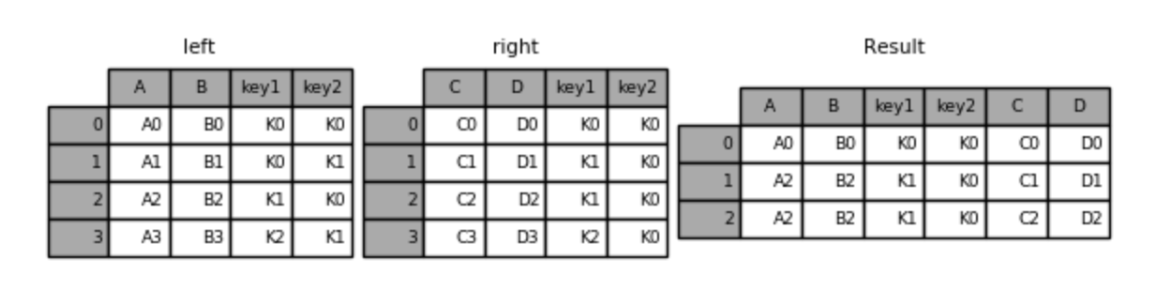
左连接:
result = pd.merge(left, right, how='left', on=['key1', 'key2'])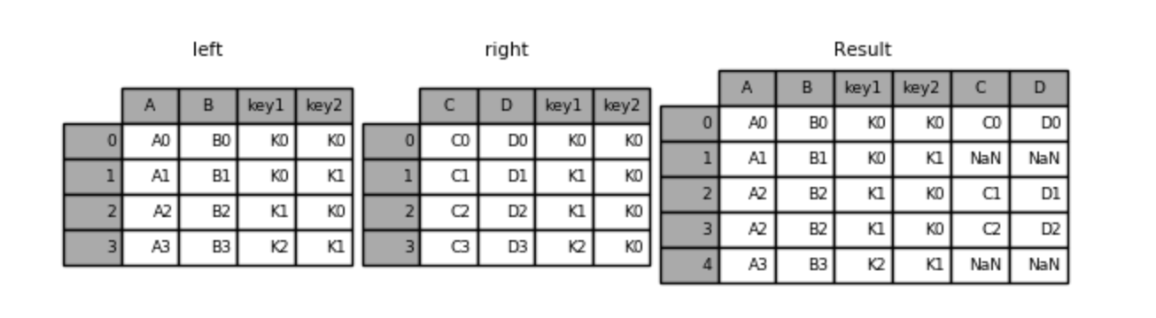
右连接:
result = pd.merge(left, right, how='right', on=['key1', 'key2'])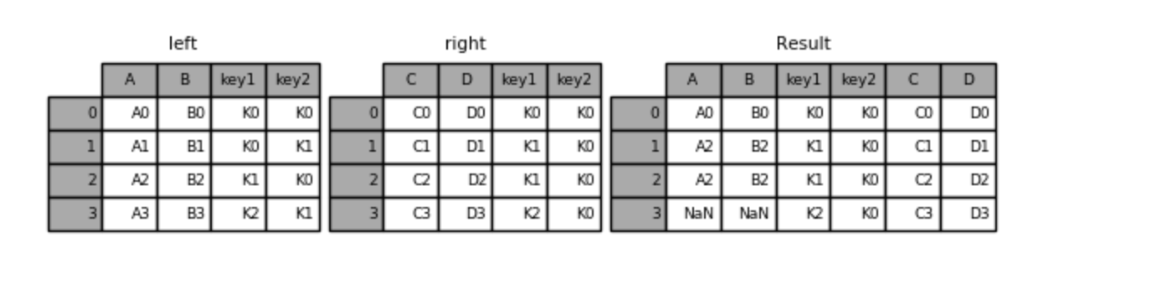
外连接:
result = pd.merge(left, right, how='outer', on=['key1', 'key2'])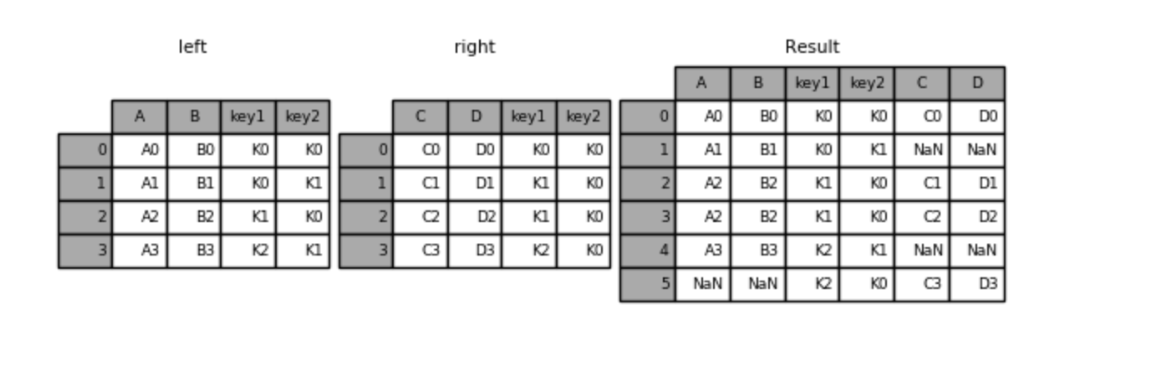
pd.join(df1, df2, how="inner"): 横向拼接,how 默认为 inner,可以指定 left,right,outer。
Pandas 数据分组与聚合
df.groupby(by): 按什么列分组,如果有多个列,需要传列表。
demo.py
import pandas as pd

df = pd.DataFrame({
    "name": ["Alice", "Bob", "Charlie", "David", "Eve", "Frank"],
    "sex": ["F", "M", "F", "M", "F", "M"],
    "city": ["New York", "New York", "New York", "Chicago", "Chicago", "Chicago"],
    "score": [25, 30, 35, 40, 45, 50]
})

sex_group = df.groupby('sex')
city_group = df.groupby('city')

print(f"sex_group: \n{sex_group.head()}\n")
print(f"city_group: \n{city_group.head()}\n")

print(f"sex_group的类型: {type(sex_group)}")
print(f"sex_group中name列的类型: {type(sex_group['name'])}")
print(f"sex_group中F组的类型: {type(sex_group.get_group('F'))}\n")

sex_city_group = df.groupby(['sex', 'city'])
print(f"sex_city_group: \n{sex_city_group.head()}")
运行结果.txt
sex_group:
      name sex      city  score
0    Alice   F  New York     25
1      Bob   M  New York     30
2  Charlie   F  New York     35
3    David   M   Chicago     40
4      Eve   F   Chicago     45
5    Frank   M   Chicago     50

city_group:
      name sex      city  score
0    Alice   F  New York     25
1      Bob   M  New York     30
2  Charlie   F  New York     35
3    David   M   Chicago     40
4      Eve   F   Chicago     45
5    Frank   M   Chicago     50

sex_group的类型: <class 'pandas.api.typing.DataFrameGroupBy'>
sex_group中name列的类型: <class 'pandas.api.typing.SeriesGroupBy'>
sex_group中F组的类型: <class 'pandas.DataFrame'>

sex_city_group:
      name sex      city  score
0    Alice   F  New York     25
1      Bob   M  New York     30
2  Charlie   F  New York     35
3    David   M   Chicago     40
4      Eve   F   Chicago     45
5    Frank   M   Chicago     50
group() 的示例操作:
demo.py
import pandas as pd

df = pd.DataFrame({
    "name": ["Alice", "Bob", "Charlie", "David", "Eve", "Frank", "Grace", "Heidi"],
    "sex": ["F", "M", "F", "M", "F", "M", "F", "M"],
    "city": ["New York", "New York", "New York", "Chicago", "Chicago", "Chicago", "Chicago", "Chicago"],
    "score": [25, 30, 35, 40, 45, 50, 55, 60],
    "grade": [1, 2, 1, 2, 3, 1, 3, 2]
})

print(f"按性别分组,计算男女生最高分: \n{df.groupby('sex').score.max()}\n")
# 还可以使用 df.groupby('sex').score.agg('max') 和 df.groupby('sex').agg({'score': 'max'})
print(f"按性别城市分组,计算每个城市的最高分: \n{df.groupby(['sex', 'city']).score.max()}\n")
# 还可以使用 df.groupby(['sex', 'city']).score.agg('max') 和 df.groupby(['sex', 'city']).agg({'score': 'max'})
print(f"按性别和城市分组,计算每个城市的最高年级和最高分: \n{df.groupby(['sex', 'city']).agg({'grade': 'max', 'score': 'max'})}\n")
运行结果.txt
按性别分组,计算男女生最高分:
sex
F    55
M    60
Name: score, dtype: int64

按性别城市分组,计算每个城市的最高分:
sex  city
F    Chicago     55
     New York    35
M    Chicago     60
     New York    30
Name: score, dtype: int64

按性别和城市分组,计算每个城市的最高年级和最高分:
              grade  score
sex city
F   Chicago       3     55
    New York      1     35
M   Chicago       2     60
    New York      2     30
使用透视表:
demo.py
import pandas as pd

df = pd.DataFrame({
    "name": ["Alice", "Bob", "Charlie", "David", "Eve", "Frank", "Grace", "Heidi"],
    "sex": ["F", "M", "F", "M", "F", "M", "F", "M"],
    "city": ["New York", "New York", "New York", "Chicago", "Chicago", "Chicago", "Chicago", "Chicago"],
    "score": [25, 30, 35, 40, 45, 50, 55, 60],
    "grade": [1, 2, 1, 2, 3, 1, 3, 2]
})

print(f"按性别分组,计算男女生最高分: \n{df.pivot_table(index='sex', values='score', aggfunc='max')}\n")
print(f"按性别城市分组,计算每个城市的最高分: \n{df.pivot_table(index=['sex', 'city'], values='score', aggfunc='max')}\n")
print(f"按性别和城市分组,计算每个城市的最高年级和最高分: \n{df.pivot_table(index=['sex', 'city'], values=['grade', 'score'], aggfunc={'grade': 'max', 'score': 'max'})}\n")
运行结果.txt
按性别分组,计算男女生最高分:
     score
sex
F       55
M       60

按性别城市分组,计算每个城市的最高分:
              score
sex city
F   Chicago      55
    New York     35
M   Chicago      60
    New York     30

按性别和城市分组,计算每个城市的最高年级和最高分:
              grade  score
sex city
F   Chicago       3     55
    New York      1     35
M   Chicago       2     60
New York 2 30df.filter(func): 过滤符合条件的数据。
# 需求: 按照城市分组, 查询每组销售金额平均值 大于 200的全部数据.
# filter(): 根据条件, 筛选出合法的数据.
# 换成SQL思路: select * from df where city in (select city from df group by city having avg(revenue) > 200);
df.groupby('city').filter(lambda s: s['revenue'].mean() > 200)
# df.groupby('city')['revenue'].filter(lambda s: s.mean() > 200)
Pandas 学习常见问题
Pandas 如何处理 None 和 NaN
- NaN (Not a Number) 来自 NumPy,是一个 浮点类型的特殊值。
- None 来自 Python,是一个 对象类型的空值。
在大多数 Pandas 场景中,None 会被自动识别为缺失,NaN 会被自动识别为缺失,isna/isnull 都能同时识别它们。
真正决定它们谁留下的是 dtype。
如果是数值列:
s = pd.Series([1, None, 3])
print(s.dtype) # float64
因为数值列 + None → Pandas 会把 None 自动转成 NaN,整列升级为 float64 (因为 NaN 只能存在于浮点里)。
s = pd.Series(["a", None, "b"]) # object如果是这样的,dtype 会被识别为 object,None 保持 None,不会强制变成 NaN,但仍然被 isna () 识别为缺失。
Pandas 的 axis = 0 什么时候是行,什么时候是列
DataFrame 像一个二维坐标系一样,axis 指的是计算/压缩/遍历发生的方向,而结果作用在剩下的那个维度上。
axis=0:跨行,对每一列做事。axis=1: 跨列,对每一行做事。
axis 从来不表示 "我要操作行还是列",它只表示 "我沿着哪条轴把数据压扁"。
举个例子:
import pandas as pd

df = pd.DataFrame({
    "A": [1, 2, 3],
    "B": [4, 5, 6]
})
表结构:
   A  B
0  1  4
1  2  5
2  3  6
如果我们用 df.sum(axis=0) 求和,结果是:
A    6
B   15
这是因为 axis=0 表示 "按列求和",所以 A 和 B 两列被求和了。nih1
如果我们用 df.sum(axis=1) 求和,结果是:
0     5
1     7
2     9
如果我们用 df.drop("A", axis=1), axis = 1 的真实含义是: "按列删除",所以删除的是列,而不是 axis = 1 就是列,而是因为 你在 columns 这条轴上做结构变化。