
外观
组件交互
使用props属性进行组件交互
组件与组件之间是需要存在交互的,否则完全没关系,组件的意义就很小了。
我们可以在porps中定义可能由其他组件传递过来的变量列表,可以是一个数组,也可以是一个列表。
<my-componentVue title="标题"/><template>
<h3>单文件组件</h3>
<p>{{ title }}</p>
</template>
<script>
export default {
name:"MyComponent",
props:{
title:{
type:String,
default:""
},
//第二种写法:props: ['title', 'subtitle', ...]
}
}
</script>如:
还是上面的例子,MyComponent1.vue:
<script>
import MyComponent2 from "@/components/MyComponent2.vue";
export default {
  components: {
    MyComponent2
  }
}
</script>

<template>
  <h1>MyComponent1的h1标签</h1>
  <MyComponent2 msg="组件传递信息" />
</template>

<style scoped>
</style>
MyComponent2.vue:
<script>
export default {
  props: ['msg']
}
</script>

<template>
  <h1>MyComponent2的h1标签</h1>
  <p>{{ msg }}</p>
</template>

<style scoped>
</style>
原理是在MyComponent1中在使用MyComponent2时传递了一个参数msg,然后在MyComponent2中使用props引出这个变量,最后输出就可以。
温馨提示:组件传递信息时,信息只能从父级组件传递到子级组件,反向传递的方法在下面有介绍。
若使用组合式API,则props需要单独声明。
<script setup>
const props = defineProps(['foo'])

console.log(props.foo)
</script>若没有<script setup>,props需要作为setup的参数。
export default {
  props: ['foo'],
  setup(props) {
    // setup() 接收 props 作为第一个参数
    console.log(props.foo)
  }
}
Prop 类型
Prop传递参数其实是没有类型限制的,可以传递数组、字符串、数字、对象。
Prop常用的可传递的参数类型都是JavaScript的内置类型,有:Number、String、Array、Object等。
props: {
  title: String,
  likes: Number,
  isPublished: Boolean,
  commentIds: Array,
  author: Object,
  callback: Function
}
例(MyComponent2.vue):
<script>
export default {
  props: {
    msg: {
      type: String,
      default: "默认值"
    }
  }
}
</script>

<template>
  <h1>MyComponent2的h1标签</h1>
  <p>{{msg}}</p>
</template>

<style scoped>
</style>
上方msg设置了类型和默认值,对于类型,若其他地方使用了这个组件时传递了错误的参数类型,控制台会警告但不会报错;对于默认值,若组件在引用时没有传递这个参数,那么这个参数在被渲染时会显示默认值。
温馨提示:
- 传递对象时,参数需要使用v-bind类型,如MyComponent1.vue:
<script>
import MyComponent2 from "@/components/MyComponent2.vue";
export default {
  components: {
    MyComponent2
  },
  data(){
    return {
      info: {
        id: 1,
        name: '张三'  // 这里使用对象类型
      }
    }
  }
}
</script>

<template>
  <MyComponent2 :info=info />  <!--这里使用v-bind类型-->
</template>

<style scoped>
</style>
MyComponent2.vue:
<script>
export default {
  props: ['info']
}
</script>

<template>
  <p>{{ info.id }}</p>
  <p>{{ info.name }}</p>
</template>

<style scoped>
</style>- 数据类型为数组或者对象的时候,默认值需要返回工厂模式,如:
<script>
    export default {
        props: {
            info : {
                type: Object,
                default: () => {
                    return {
                        id: 1,
                        name: '张三'  //默认值使用工厂模式,使用匿名函数
                    }
                }
            }
        }
    }
</script>

<template>
<p>{{ info.id }}</p>
<p>{{ info.name }}</p>
</template>

<style scoped>
</style>
自定义事件组件交互
上述使用props方法在组件间传递数据时数据只能由父组件传递至子组件,不能反向传递。若要实现反向传递,有一种方法就是利用自定义组件交互。具体实现方法就是在子组件中为一个元素(如按钮)添加事件监听,监听后触发的函数内部调用this.$emit函数。第一个参数为父组件使用子组件时使用v-on绑定的自定义名称,第二个参数为函数参数。在父组件中,实现了子组件触发了事件监听的函数后,在调用子组件时,用v-on将子组件中用this.$emit函数的第一个参数定义的自定义名称传递到子组件,当子组件触发了事件监听时,emit就会执行父组件的函数。
<template>
    <h3>单文件组件</h3>
    <button @click="sendHandle">发送数据</button>  <!--这里写函数名称,函数内部要有this.$emit-->
</template>

<script>
export default {
    name: "MyComponent",
    methods:{
        sendHandle(){
            this.$emit("onCustom","数据")  //这里调用$emit
        }
    }
}
</script>

<style scoped>
h3 {
    color: red;
}
</style><template>
<my-componentVue @onCustom="getData" /> <!--这里使用子组件$emit调用时传递的第一个参数,值写要调用的函数-->
</template>
<script>
import MyComponentVue from './components/MyComponent.vue'
export default {
name: 'App',
components: {
MyComponentVue
},
methods: {
getData(data) {
console.log(data);
}
}
}
</script>props只读
上方演示了在不同组件之间传递变量,这些变量实际上值都是不能改变的,即在一个组件传入另一个组件的值是不能改变的,如下方的语法是错误的。
<!--MyComponent1-->
<template>
  <MyComponent2 msg='msg'/>
</template>
<script>
import MyComponent2 from '@/components/MyComponent2.vue'
export default {
  components: {
    MyComponent2
  },
  data(){
    return {
      msg: '值1'
    }
  }
}
</script>
<!--MyComponent2-->
<template>
<button @click='clickMethod'>点击更改msg的值</button>
<p>msg = {{ msg }}</p>
</template>
<script>
export default {
props: ['msg'],
methods: {
clickMethod(){
this.msg = '值2' //错误的语法
}
}
}
</script>Prop组件与v-model一起使用
子组件内,我们可以用v-model与一个变量绑定(在data中声明),然后在watch中添加一个和这个变量同名的方法,如下。
<!--MyComponent2-->
<template>
  <input v-model="number" type="range">
</template>
<script>
export default {
  data() {
    return {
      number: 0
    }
  },
  watch: {
    number(newValue, oldValue) {
      this.$emit('emitEvent', newValue);
    }
  }
}
</script>
父组件内,定义一个用于显示的元素,并实现一个设置此元素的方法。使用上面的方法导入并显示这个组件后,传递一个v-on参数,参数的名称是子组件内要改变的那个值,值写设置父组件值的函数。
<!--MyComponent1-->
<template>
  <MyComponent2 @emitEvent="setData"/>
  <p>msg = {{ data }}</p>
</template>
<script>
import MyComponent2 from '@/components/MyComponent2.vue'

export default {
  components: {
    MyComponent2
  },
  data() {
    return {
      data: 1
    }
  },
  methods: {
    setData(value) {
      this.data = value
    }
  }
}
</script>
这样子组件的变量会改变,并在父组件中显示。
组件生命周期
每个组件在被创建时都要经过一系列的初始化过程——例如,需要设置数据监听、编译模板、将实例挂载到 DOM 并在数据变化时更新 DOM 等。同时在这个过程中也会运行一些叫做生命周期钩子的函数,这给了用户在不同阶段添加自己的代码的机会。
为了方便记忆,我们可以将他们分类:
创建时:beforeCreate、created
渲染时:beforeMount、mounted
更新时:beforeUpdate、updated
卸载时:beforeUnmount、unmounted
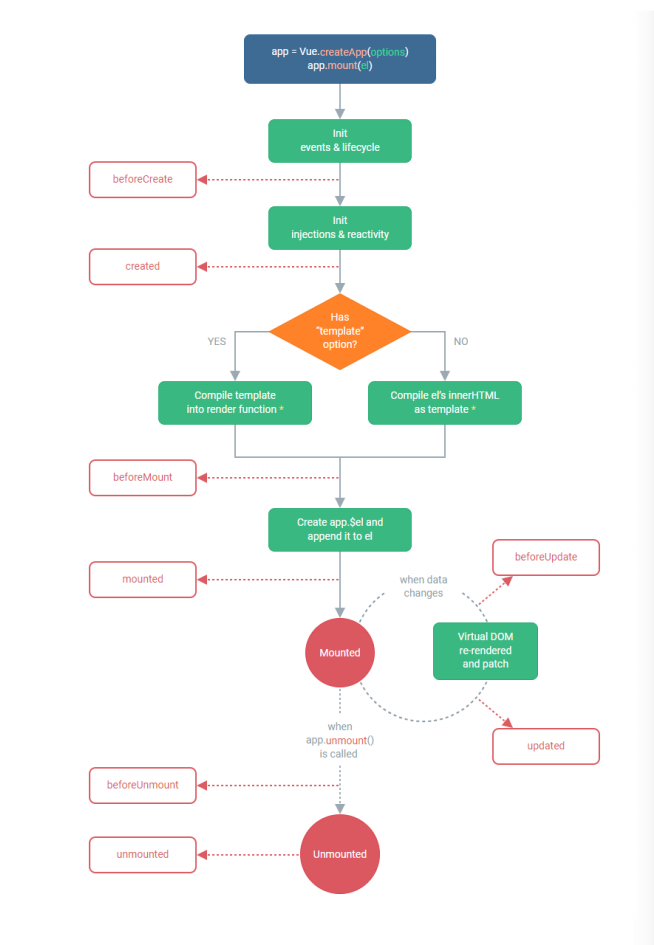
生命周期函数是和data()函数绑定在一起的,这八个函数要写在它里面。
比如mounted函数可以存放与网络请求有关的代码,unmounted可以存放与销毁组件有关的代码,可以销毁吃性能的组件。