
外观
PyTorch
介绍
pytorch 是深度学习的框架,Python 的第三方包,数据以张量形式存在。
张量可以看作是矩阵,涵盖了常数、向量、矩阵等对象。深度学习中,数据都是通过张量表示的,无论是常数、向量,还是矩阵。
张量创建
torch.tensor(data, dtype, device): 根据数据创建张量,不能指定维度。torch.Tensor(data, size): 可以指定数据或形状创建张量。torch.IntTensor(data)、torch.FloatTensor():指定类型。
import torch
import numpy as np

list1 = [[1, 2, 3], [4, 5, 6]]
t1 = torch.tensor(list1)
print(t1, type(t1))
# tensor([[1, 2, 3],
#         [4, 5, 6]]) <class 'torch.Tensor'>

int1 = 10
t2 = torch.tensor(int1)
print(t2, type(t2))  # tensor(10) <class 'torch.Tensor'>

n1 = np.array([[1., 2., 3.], [4., 5., 6.]])
t3 = torch.tensor(n1)
print(t3, type(t3))
# tensor([[1., 2., 3.],
#         [4., 5., 6.]], dtype=torch.float64) <class 'torch.Tensor'>

t4 = torch.Tensor(list1)
print(t4, type(t4))

# tensor([[1., 2., 3.],
#         [4., 5., 6.]]) <class 'torch.Tensor'>

t5 = torch.Tensor(size=(2, 3))
print(t5, type(t5))
# tensor([[-2.2507e+12,  1.4111e-42,  0.0000e+00],
#         [ 0.0000e+00,  0.0000e+00,  0.0000e+00]]) <class 'torch.Tensor'>

t6 = torch.IntTensor([[1.1, 2, 3.7], [4, 5, 6]])
print(t6, type(t6))
# tensor([[1, 2, 3],
#         [4, 5, 6]], dtype=torch.int32) <class 'torch.Tensor'>

t7 = torch.FloatTensor([[1.1, 2, 3.7], [4, 5, 6]])
print(t7, type(t7))
# tensor([[1.1000, 2.0000, 3.7000],
#         [4.0000, 5.0000, 6.0000]]) <class 'torch.Tensor'>
线性和随机张量
torch.arange(start=, end=, step=):创建指定步长的线性张量,左闭右开。torch.linspace(start=, end=, steps=):创建指定元素个数的线性张量,左闭右闭。torch.rand(size=)/randn(size=):创建指定形状的随机浮点类型张量。torch.randint(low=, high=, size=):创建指定形状指定范围随机整数类型张量,左闭右开。
import torch

t1 = torch.arange(0, 10, 2)
print(t1, type(t1))  # tensor([0, 2, 4, 6, 8]) <class 'torch.Tensor'>

t2 = torch.linspace(0, 10, 5)
print(t2, type(t2))
# tensor([ 0.0000,  2.5000,  5.0000,  7.5000, 10.0000]) <class 'torch.Tensor'>

t3 = torch.rand(size=(2, 1))
print(t3, type(t3))
# tensor([[0.3208],
#         [0.5004]]) <class 'torch.Tensor'>

t4 = torch.randint(0, 10, (2, 3))
print(t4, type(t4))
# tensor([[9, 3, 4],
#         [8, 7, 8]]) <class 'torch.Tensor'>
0/1/指定值张量
torch.ones(size=):创建全 1 张量。torch.zeros(size=):创建全 0 张量。torch.full(size=, fill_value=):创建指定值张量。torch.ones_like(input=tensor):创建与输入张量形状相同的全 1 张量。torch.zeros_like(input=tensor):创建与输入张量形状相同的全 0 张量。torch.full_like(input=tensor, fill_value=):创建与输入张量形状相同的指定值张量。
import torch

t1 = torch.ones(size=(2, 3))
print(t1, type(t1))
# tensor([[1., 1., 1.],
#         [1., 1., 1.]]) <class 'torch.Tensor'>

t2 = torch.zeros(size=(2, 3))
print(t2, type(t2))
# tensor([[0., 0., 0.],
#         [0., 0., 0.]]) <class 'torch.Tensor'>

t3 = torch.full(size=(2, 3), fill_value=5)
print(t3, type(t3))
# tensor([[5, 5, 5],
#         [5, 5, 5]]) <class 'torch.Tensor'>

t4 = torch.zeros_like(t1)
print(t4, type(t4))
# tensor([[0., 0., 0.],
#         [0., 0., 0.]]) <class 'torch.Tensor'>

t5 = torch.full_like(t1, fill_value=8)
print(t5, type(t5))
# tensor([[8., 8., 8.],
#         [8., 8., 8.]]) <class 'torch.Tensor'>
指定元素类型张量
tensor.type(dtype):返回指定数据类型的张量。tensor.half():转换为float16类型张量。tensor.float():转换为float32类型张量。tensor.double():转换为float64类型张量。tensor.short():转换为int16类型张量。tensor.int():转换为int32类型张量。tensor.long():转换为int64类型张量。
import torch

t1 = torch.tensor([[1, 2], [3, 4]])
print(t1, t1.dtype)  # tensor([[1, 2],[3, 4]]) torch.int64

t2 = t1.float()
print(t2, t2.dtype)  # tensor([[1., 2.],[3., 4.]]) torch.float32

t3 = t1.double()
print(t3, t3.dtype)  # tensor([[1., 2.],[3., 4.]]) torch.float64

t4 = t1.half()
print(t4, t4.dtype)  # tensor([[1., 2.],[3., 4.]], dtype=torch.float16)

t5 = t1.short()
print(t5, t5.dtype)  # tensor([[1, 2],[3, 4]], dtype=torch.int16)

t6 = t1.int()
print(t6, t6.dtype)  # tensor([[1, 2],[3, 4]], dtype=torch.int32)

t7 = t1.long()
print(t7, t7.dtype)  # tensor([[1, 2],[3, 4]], dtype=torch.int64)
half指的是 16 位浮点数类型,也就是float16。
张量类型转换
与 NumPy 的互相转化
张量 → NumPy
tensor.numpy():转换为 NumPy 数组,共享内存,修改一个会影响另一个。tensor.numpy().copy():生成不共享内存的副本。
NumPy → 张量
torch.from_numpy(ndarray):NumPy 数组转换为张量,共享内存。torch.tensor(data=ndarray):NumPy 数组转换为张量,不共享内存。
import torch
import numpy as np

# 张量转换为 NumPy
t1 = torch.tensor([[1, 2, 3], [4, 5, 6]])
print('t1->', t1)

n1 = t1.numpy().copy()  # 不共享内存
print('n1->', n1)
print('n1类型->', type(n1))

n1[0][0] = 100
print('n1修改后->', n1)
print('t1->', t1)


# NumPy 转换为张量
n2 = np.array([[1, 2, 3], [4, 5, 6]])
t2 = torch.from_numpy(n2)  # 共享内存
# t2 = torch.tensor(n2)      # 不共享内存

print('t2->', t2)
print('t2类型->', type(t2))

t2[0][0] = 8888
print('t2修改后->', t2)
print('n2->', n2)
提取标量张量的数值
tensor.item():提取 单元素张量 的数值。- 张量可以是 标量 / 一维 / 二维 / 多维,只要 元素数量为 1 即可使用。
import torch

# 标量张量
t1 = torch.tensor(10)
print(t1)  # tensor(10)
print(t1.shape)  # torch.Size([])
print(t1.item())  # 10


# 一维单元素张量
t2 = torch.tensor([10])
print(t2)  # tensor([10])
print(t2.shape)  # torch.Size([1])
print(t2.item())  # 10


# 二维单元素张量
t3 = torch.tensor([[10]])
print(t3)  # tensor([[10]])
print(t3.shape)  # torch.Size([1, 1])
print(t3.item())  # 10
张量的运算
基本运算
+ - * / -:张量支持基本算术运算。tensor/torch.add():加法。tensor/torch.sub():减法。tensor/torch.mul():乘法。tensor/torch.div():除法。tensor/torch.neg():取负。tensor.add_():原地加法。tensor.sub_():原地减法。tensor.mul_():原地乘法。tensor.div_():原地除法。tensor.neg_():原地取负。
import torch

t1 = torch.tensor([1, 2, 3])
t2 = torch.tensor([4, 5, 6])

# 基本运算
print(t1 + t2)  # tensor([5, 7, 9])
print(t1 - t2)  # tensor([-3, -3, -3])
print(t1 * t2)  # tensor([ 4, 10, 18])
print(t1 / t2)  # tensor([0.2500, 0.4000, 0.5000])

# 函数形式
print(torch.add(t1, t2))  # tensor([5, 7, 9])
print(torch.sub(t1, t2))  # tensor([-3, -3, -3])
print(torch.mul(t1, t2))  # tensor([ 4, 10, 18])
print(torch.div(t1, t2))  # tensor([0.2500, 0.4000, 0.5000])
print(torch.neg(t1))      # tensor([-1, -2, -3])


# 原地运算
t3 = torch.tensor([1, 2, 3])
t3.add_(1)
print(t3)  # tensor([2, 3, 4])
点乘运算(逐元素乘)
*:张量对应位置元素相乘(逐元素乘)。torch.mul():逐元素乘函数形式。tensor.mul():逐元素乘方法形式。- 一般要求 张量形状相同,或者满足 广播机制(broadcasting)。
- 返回的新张量形状与参与计算的张量一致。
import torch

t1 = torch.tensor([[1, 2, 3],
                   [4, 5, 6]])

t2 = torch.tensor([[10, 20, 30],
                   [40, 50, 60]])

# 运算符形式
t3 = t1 * t2
print(t3)
# tensor([[ 10,  40,  90],
#         [160, 250, 360]])

# 函数形式
t4 = torch.mul(t1, t2)
print(t4)
# tensor([[ 10,  40,  90],
#         [160, 250, 360]])

# 方法形式
t5 = t1.mul(t2)
print(t5)
# tensor([[ 10,  40,  90],
#         [160, 250, 360]])
矩阵乘法运算
@:矩阵乘法运算符。torch.matmul():矩阵乘法函数形式。tensor.matmul():矩阵乘法方法形式。torch.mm():二维矩阵乘法。- 计算规则:第一个矩阵的 行 与第二个矩阵的 列 进行乘法并求和。
- 维度要求:
(m × n) · (n × p) → (m × p),即第一个矩阵的列数必须等于第二个矩阵的行数。
import torch

t1 = torch.tensor([[1, 2, 3],
                   [4, 5, 6]])

t2 = torch.tensor([[1, 2],
                   [3, 4],
                   [5, 6]])

# 运算符形式
t3 = t1 @ t2
print(t3)
# tensor([[22, 28],
#         [49, 64]])

# 函数形式
t4 = torch.matmul(t1, t2)
print(t4)
# tensor([[22, 28],
#         [49, 64]])

# 二维矩阵乘法
t5 = torch.mm(t1, t2)
print(t5)
# tensor([[22, 28],
#         [49, 64]])
统计与数学运算
tensor.mean():计算张量所有元素的平均值。tensor.sum():计算张量所有元素的和。tensor.min()/tensor.max():计算最小值 / 最大值。dim=:按指定维度进行计算。tensor.exp():指数运算 (e^x)。tensor.sqrt():平方根。tensor.pow():幂次方。tensor.log()/tensor.log2()/tensor.log10():对数运算。
import torch

t1 = torch.tensor([[1., 2., 3.],
                   [4., 5., 6.]])

print(t1.mean())  # tensor(3.5000)
print(t1.sum())   # tensor(21.)

print(t1.min())   # tensor(1.)
print(t1.max())   # tensor(6.)

# 按维度计算
print(t1.sum(dim=0))  # tensor([5., 7., 9.])
print(t1.sum(dim=1))  # tensor([ 6., 15.])


# 数学运算
print(t1.exp())
# tensor([[  2.7183,   7.3891,  20.0855],
#         [ 54.5982, 148.4132, 403.4288]])

print(t1.sqrt())
# tensor([[1.0000, 1.4142, 1.7321],
#         [2.0000, 2.2361, 2.4495]])

print(t1.pow(2))
# tensor([[ 1.,  4.,  9.],
#         [16., 25., 36.]])

print(t1.log())
print(t1.log2())
print(t1.log10())
张量索引操作
张量下标 从左到右从 0 开始,从右到左从 -1 开始。
多维张量索引格式:data[行下标, 列下标]。
更高维张量:data[0轴下标, 1轴下标, 2轴下标]。
data[i]:取第i行。data[:, j]:取第j列。data[[...], [...]]:按索引列表取值。data[条件]:按布尔条件筛选。data[start:end:step]:切片取值。
import torch

torch.manual_seed(0)

# 创建张量
data = torch.randint(0, 10, (4, 5))
print('data->', data)

# 行数据(第一行)
print('data[0]->', data[0])

# 列数据(第一列)
print('data[:,0]->', data[:, 0])

# 根据下标列表取值
# 第二行第三列 和 第四行第五列
print('data[[1,3],[2,4]]->', data[[1, 3], [2, 4]])

# 组合索引
print('data[[[1],[3]],[2,4]]->', data[[[1], [3]], [2, 4]])

# 布尔索引
# 第二列大于6的所有行
print(data[:, 1] > 6)
print('data[data[:,1]>6]->', data[data[:, 1] > 6])

# 第三行大于6的列
print('data[:,data[2]>6]->', data[:, data[2] > 6])

# 切片
# 第一行第三行 + 第二列第四列
print('data[::2,1::2]->', data[::2, 1::2])

# 三维张量
data2 = torch.randint(0, 10, (3, 4, 5))
print('data2->', data2)

# 0轴第一个
print(data2[0, :, :])

# 1轴第一个
print(data2[:, 0, :])

# 2轴第一个
print(data2[:, :, 0])
张量的形状操作
reshape
用于 重新调整张量形状,元素总数必须保持一致。
tensor.reshape(shape):返回新的张量,自动判断是否需要复制数据。- 可以使用
-1自动推断某一维大小。 - 不要求张量必须是 内存连续。
demo.py
import torch

# 创建张量
t = torch.arange(12)
print("t->", t)
print("shape->", t.shape)

# 改变形状
t2 = t.reshape(3, 4)
print("reshape(3, 4)->")
print(t2)
print("shape->", t2.shape)

# 使用 -1 自动推断维度
t3 = t.reshape(3, -1)
print("reshape(3, -1)->")
print(t3)
print("shape->", t3.shape)
运行结果.txt
t-> tensor([ 0,  1,  2,  3,  4,  5,  6,  7,  8,  9, 10, 11])
shape-> torch.Size([12])
reshape(3, 4)->
tensor([[ 0,  1,  2,  3],
        [ 4,  5,  6,  7],
        [ 8,  9, 10, 11]])
shape-> torch.Size([3, 4])
reshape(3, -1)->
tensor([[ 0,  1,  2,  3],
        [ 4,  5,  6,  7],
        [ 8,  9, 10, 11]])
shape-> torch.Size([3, 4])
squeeze / unsqueeze
用于 删除或增加维度,常用于处理批次维度或通道维度。
tensor.squeeze():删除所有 大小为 1 的维度。tensor.squeeze(dim):删除指定维度(该维度必须为1)。tensor.unsqueeze(dim):在指定位置 增加一个维度。
demo.py
import torch

# 创建张量
t = torch.randn(1, 3, 1, 5)
print("t.shape->", t.shape)

# 删除所有为1的维度
t2 = t.squeeze()
print("squeeze()->", t2.shape)

# 删除指定维度
t3 = t.squeeze(2)
print("squeeze(2)->", t3.shape)

# 增加维度
t4 = torch.randn(3, 4)
print("t4.shape->", t4.shape)

t5 = t4.unsqueeze(0)
print("unsqueeze(0)->", t5.shape)

t6 = t4.unsqueeze(2)
print("unsqueeze(2)->", t6.shape)
运行结果.txt
t.shape-> torch.Size([1, 3, 1, 5])
squeeze()-> torch.Size([3, 5])
squeeze(2)-> torch.Size([1, 3, 5])
t4.shape-> torch.Size([3, 4])
unsqueeze(0)-> torch.Size([1, 3, 4])
unsqueeze(2)-> torch.Size([3, 4, 1])
transpose / permute
用于 交换或重新排列张量维度。
tensor.transpose(dim0, dim1):交换两个维度。tensor.permute(dims):按指定顺序 重新排列所有维度。
demo.py
import torch

# 二维张量
t = torch.randn(2, 3)
print("t.shape->", t.shape)

# 交换两个维度
t2 = t.transpose(0, 1)
print("transpose(0,1)->")
print(t2)
print("shape->", t2.shape)

# 三维张量
t3 = torch.randn(2, 3, 4)
print("t3.shape->", t3.shape)

# 重新排列维度
t4 = t3.permute(2, 0, 1)
print("permute(2,0,1)->", t4.shape)
运行结果.txt
t.shape-> torch.Size([2, 3])
transpose(0,1)->
tensor([[ 1.6709, -0.3964],
        [-0.4608,  0.9617],
        [-1.4908, -0.7886]])
shape-> torch.Size([3, 2])
t3.shape-> torch.Size([2, 3, 4])
permute(2,0,1)-> torch.Size([4, 2, 3])
view / contiguous
用于 改变张量形状并保证内存布局正确。
tensor.view(shape):改变张量形状,但要求 张量内存连续。tensor.contiguous():返回一个 内存连续的张量副本。transpose或permute后张量通常 不是连续内存。
demo.py
import torch

x = torch.arange(12).reshape(3, 4)
print("x.shape->", x.shape)

# 转置后张量
y = x.transpose(0, 1)
print("y.shape->", y.shape)

print("is_contiguous->", y.is_contiguous())

# 需要先变为连续内存
z = y.contiguous().view(12)
print("z->", z)
print("z.shape->", z.shape)
运行结果.txt
x.shape-> torch.Size([3, 4])
y.shape-> torch.Size([4, 3])
is_contiguous-> False
z-> tensor([ 0,  4,  8,  1,  5,  9,  2,  6, 10,  3,  7, 11])
z.shape-> torch.Size([12])
张量拼接
torch.cat(tensors, dim)、torch.concat(tensors, dim):在指定维度上进行拼接, 其他维度值必须相同, 不改变新张量的维度, 指定维度值相加。torch.stack(tensors, dim):根据指定维度进行堆叠, 在指定维度上新增一个维度(维度值张量个数), 新张量维度发生改变。
demo.py
import torch

torch.manual_seed(0)

t1 = torch.randint(0, 10, (2, 3))
t2 = torch.randint(0, 10, (2, 3))
t3 = torch.cat([t1, t2], 0)

print(f"{t1}\n\n        [cat]\n\n{t2}\n\n        =\n\n{t3}")
运行结果.txt
tensor([[4, 9, 3],
        [0, 3, 9]])

        [cat]

tensor([[7, 3, 7],
        [3, 1, 6]])

        =

tensor([[4, 9, 3],
        [0, 3, 9],
        [7, 3, 7],
        [3, 1, 6]])
demo.py
import torch

torch.manual_seed(0)

t1 = torch.randint(0, 10, (2, 3))
t2 = torch.randint(0, 10, (2, 3))
t3 = torch.stack([t1, t2], 0)

print(f"{t1}\n\n        [cat]\n\n{t2}\n\n        =\n\n{t3}")
运行结果.txt
tensor([[4, 9, 3],
        [0, 3, 9]])

        [stack]

tensor([[7, 3, 7],
        [3, 1, 6]])

        =

tensor([[[4, 9, 3],
         [0, 3, 9]],

        [[7, 3, 7],
         [3, 1, 6]]])
自动微分模块
方法和属性
PyTorch 的自动微分大致分为四步:张量创建、梯度控制、反向传播、梯度管理。
张量创建:这一步用来创建可求导张量。
torch.tensor(data, requires_grad=True)创建参与自动求导的张量。tensor.requires_grad_()原地修改张量,使其开始记录梯度。tensor.detach()返回一个 不再参与计算图 的新张量。tensor.detach_()原地从计算图中分离。
前向传播:前向传播阶段 不需要特殊 API,只要使用 PyTorch 的运算即可自动构建计算图。
如
+、-、*、/、**、torch.matmul()、torch.sum()、torch.mean()。只要参与运算的张量 requires_grad=True,运算就会被记录到计算图。
反向传播:
tensor.backward(),从当前节点向后计算梯度。计算完成后通过
w.grad,即可获得该张量的梯度。访问梯度:通过
tensor.grad获取梯度。梯度清零:训练循环中必须清零梯度,否则会累加。
可通过
tensor.grad.zero_()、optimizer.zero_grad()。
| 类别 | API |
|---|---|
| 创建梯度 | requires_grad=True |
| 修改梯度状态 | requires_grad_() |
| 分离计算图 | detach() |
| 反向传播 | backward() |
| 获取梯度 | tensor.grad |
| 手动求导 | torch.autograd.grad() |
| 关闭梯度 | torch.no_grad() |
| 清空梯度 | grad.zero_() |
梯度计算
梯度下降法详细介绍请看机器学习->线性回归。
梯度公式:
使用到的 API:
torch.tensor(data, requires_grad=True, dtype=torch.SomeDtype)关键参数是 requires_grad,它代表自动求解梯度(自动微分),此时 dtype 必须是浮点类型或复数类型。
首先创建权重张量 w:
w = torch.tensor(data=10, requires_grad=True, dtype=torch.float32)输出:
w -> tensor(10., requires_grad=True)这里 w 是模型参数,初始值为:
然后定义损失函数:
loss = w**2 + 20数学表达式:
输出:
loss -> tensor(120., grad_fn=<AddBackward0>)其中 grad_fn=<AddBackward0> 表示该张量是由加法运算产生的,PyTorch 已经为其构建了计算图。
因为 w 是标量张量,所以 loss 也是标量,可以直接进行反向传播:
loss.backward()PyTorch 会根据计算图自动求导。
损失函数:
对 求导:
因此梯度为:
代入当前参数:
得到梯度:
代码查看梯度:
print("w.grad->", w.grad)输出:
w.grad -> tensor(20.)接下来使用梯度下降更新参数。根据梯度下降公式:
代码实现:
w.data = w.data - 0.01 * w.grad其中:
0.01是 学习率(learning rate)w.grad是当前计算得到的梯度
计算过程:
更新后:
w -> tensor(9.8000, requires_grad=True)代码中使用了 w.data。data 表示 直接访问张量的数据部分,不参与计算图,这样更新参数时不会被 autograd 记录。
不过在现代 PyTorch 中不推荐使用 .data,更推荐写法是:
with torch.no_grad():
    w -= 0.01 * w.grad
然后清空梯度:
w.grad.zero_()这是因为 PyTorch 的梯度 默认是累加的,如果不清零,下次反向传播会叠加到旧梯度上。
完整训练过程示例:
import torch

w = torch.tensor(data=10, requires_grad=True, dtype=torch.float32)

for i in range(1000):

    # 前向传播
    loss = w**2 + 20

    # 梯度清零
    if w.grad is not None:
        w.grad.zero_()

    # 反向传播
    loss.backward()

    # 梯度下降更新参数
    w.data = w.data - 0.01 * w.grad

    print("step:", i, "w:", w, "loss:", loss)
随着迭代进行:
w → 0
loss → 20
最终模型收敛到最优解:
最小损失:
后几步的运行结果:
step: 994 w: tensor(1.8619e-08, requires_grad=True) loss: tensor(20., grad_fn=<AddBackward0>)
step: 995 w: tensor(1.8246e-08, requires_grad=True) loss: tensor(20., grad_fn=<AddBackward0>)
step: 996 w: tensor(1.7881e-08, requires_grad=True) loss: tensor(20., grad_fn=<AddBackward0>)
step: 997 w: tensor(1.7524e-08, requires_grad=True) loss: tensor(20., grad_fn=<AddBackward0>)
step: 998 w: tensor(1.7173e-08, requires_grad=True) loss: tensor(20., grad_fn=<AddBackward0>)
step: 999 w: tensor(1.6830e-08, requires_grad=True) loss: tensor(20., grad_fn=<AddBackward0>)
可以看到,无限趋近于零,找到了 的最低点和对应的权重。
自动微分的张量不能转换为 numpy 数组,需要借助
detach()生成新的不自动微分张量。
代码演示——模拟线性回归
首先创建一组散点,模拟特征和标签。
from sklearn.datasets import make_regression
import torch

x, y, coef = make_regression(
    n_samples=100,  # 100条样本(100个样本点)
    n_features=1,  # 1个特征(1个特征点)
    noise=10,  # 噪声, 噪声越大, 样本点越散, 噪声越小, 样本点越集中
    coef=True,  # 是否返回系数, 默认为False, 返回值为None
    bias=14.5,  # 偏置
    random_state=3  # 随机种子, 随机种子相同, 输出数据相同
)

x = torch.tensor(x, dtype=torch.float32)
y = torch.tensor(y, dtype=torch.float32)
自动微分需要浮点数,所以在这里做一下转换。
然后开始训练。
PyTorch 的模型训练流程通常包含:数据集构建、数据加载、模型定义、损失函数、优化器、训练循环、结果可视化。
数据集构建:将
Tensor封装为 数据集对象,用于后续批量读取。TensorDataset(x, y)将特征和标签组合成一个数据集。
数据加载:通过数据加载器按 批次(batch) 读取数据。
DataLoader(dataset, batch_size=16, shuffle=True)batch_size:每次训练使用的样本数量shuffle:是否打乱数据(训练集通常打乱)
模型定义:构建神经网络模型。
nn.Linear(in_features, out_features)创建线性回归模型model.parameters()获取模型参数(用于优化器)
损失函数:用于衡量预测值与真实值之间的误差。
nn.MSELoss()均方误差损失(回归任务常用)
优化器:根据梯度更新模型参数。
optim.SGD(model.parameters(), lr=0.01)lr表示 学习率
前向传播:模型根据输入数据计算预测值。
y_pred = model(x)
损失计算:计算当前批次预测误差。
loss = criterion(y_pred, y_true)
反向传播:自动计算梯度。
loss.backward()
梯度更新:根据梯度更新模型参数。
optimizer.step()
梯度清零:防止梯度累加。
optimizer.zero_grad()
| 类别 | API |
|---|---|
| 数据集 | TensorDataset() |
| 数据加载 | DataLoader() |
| 模型 | nn.Linear() |
| 损失函数 | nn.MSELoss() |
| 优化器 | optim.SGD() |
| 前向传播 | model(x) |
| 反向传播 | loss.backward() |
| 梯度更新 | optimizer.step() |
| 清空梯度 | optimizer.zero_grad() |
训练流程
完整的模型训练通常包含 多轮(epoch)训练,每一轮会遍历所有批次数据。
训练过程如下:
- 从
DataLoader读取批次数据 - 执行前向传播得到预测值
- 计算损失
- 执行反向传播计算梯度
- 使用优化器更新参数
核心训练代码示例:
# 创建数据集
dataset = TensorDataset(x, y)

# 创建数据加载器
dataloader = DataLoader(dataset, batch_size=16, shuffle=True)

# 创建模型
model = nn.Linear(1, 1)

# 损失函数
criterion = nn.MSELoss()

# 优化器
optimizer = optim.SGD(model.parameters(), lr=0.01)

epochs = 100

for epoch in range(epochs):

    for train_x, train_y in dataloader:

        # 前向传播
        y_pred = model(train_x)

        # 计算损失
        loss = criterion(y_pred, train_y.reshape(-1, 1))

        # 梯度清零
        optimizer.zero_grad()

        # 反向传播
        loss.backward()

        # 更新参数
        optimizer.step()
训练损失统计
在训练过程中通常需要统计 每轮(epoch)的平均损失。
示例实现:
loss_list = []
total_loss = 0
total_sample = 0

for epoch in range(epochs):

    for train_x, train_y in dataloader:

        y_pred = model(train_x)
        loss = criterion(y_pred, train_y.reshape(-1, 1))

        total_loss += loss.item()
        total_sample += 1

        optimizer.zero_grad()
        loss.backward()
        optimizer.step()

    avg_loss = total_loss / total_sample
    loss_list.append(avg_loss)

    print(f"轮数: {epoch+1}, 平均损失值: {avg_loss}")
其中:
loss.item():将 Tensor 转换为 Python 数值loss_list:用于记录每轮损失变化
训练结果
训练结束后可以查看模型参数:
print("权重:", model.weight)
print("偏置:", model.bias)
线性回归模型数学表达式:
其中:
- :模型权重
model.weight - :模型偏置
model.bias
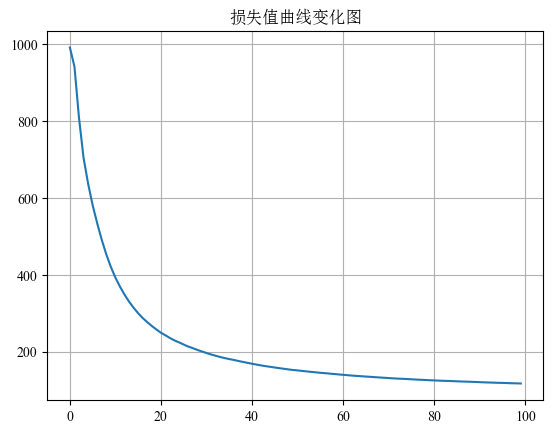
损失曲线可视化
训练过程中常绘制 损失函数变化曲线:
plt.plot(range(epochs), loss_list)
plt.title("损失值曲线变化图")
plt.grid()
plt.show()
该曲线可以用于判断:
- 是否收敛
- 是否学习率过大
- 是否训练不足
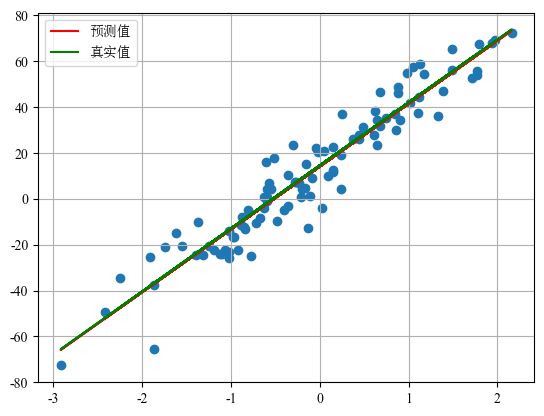
预测结果可视化
训练完成后可以绘制 预测值与真实值对比图:
# 绘制原始样本
plt.scatter(x, y)

# 模型预测
y_pred = torch.tensor([v * model.weight + model.bias for v in x])

# 真实函数
y_true = torch.tensor([v * coef + 14.5 for v in x])

plt.plot(x, y_pred, color="red", label="预测值")
plt.plot(x, y_true, color="green", label="真实值")

plt.legend()
plt.grid()
plt.show()
图像中:
- 散点:真实样本数据
- 红线:模型预测曲线
- 绿线:真实函数曲线
如果训练良好,两条线应 基本重合。
PyTorch 将计算移动到 GPU
在 PyTorch 中,将张量(Tensor)移动到 GPU 设备主要有以下几种常见方法。
tensor.to(device)
最通用、推荐的方法,可以同时用于 CPU ↔ GPU 之间的迁移。
import torch

# 创建张量
x = torch.tensor([1, 2, 3])

# 指定GPU设备
device = torch.device("cuda")

# 移动到GPU
x = x.to(device)

print(x.device)  # cuda:0
也可以直接写成:
x = x.to("cuda")如果有多块 GPU:
x = x.to("cuda:1")tensor.cuda()
专门用于将张量移动到 GPU。
import torch

x = torch.tensor([1, 2, 3])

# 移动到默认GPU
x = x.cuda()

print(x.device)  # cuda:0
指定 GPU:
x = x.cuda(1) # cuda:1创建张量时直接指定设备
在创建 Tensor 时就放到 GPU 上。
import torch

x = torch.tensor([1, 2, 3], device="cuda")

print(x.device)  # cuda:0
也可以使用 torch.device:
device = torch.device("cuda")
x = torch.tensor([1, 2, 3], device=device)
使用 model.to(device)(模型参数迁移)
训练时通常需要将 模型参数和数据同时移动到 GPU。
import torch
import torch.nn as nn

device = torch.device("cuda")

model = nn.Linear(3, 1)

# 模型移动到GPU
model = model.to(device)

x = torch.randn(2, 3).to(device)

y = model(x)
判断 GPU 是否可用(常见写法)
device = torch.device("cuda" if torch.cuda.is_available() else "cpu")

x = torch.tensor([1, 2, 3]).to(device)
总结:
| 方法 | 说明 | 推荐程度 |
|---|---|---|
tensor.to(device) | 通用设备迁移方法 | 推荐 |
tensor.cuda() | 仅用于 GPU | 可用 |
创建时 device="cuda" | 初始化直接在 GPU | 常用 |
model.to(device) | 模型迁移到 GPU | 训练必须 |