
外观
大模型 Function Call
2023年6月13日 OpenAI 公布了 Function Call(函数调用) 功能,该功能指的是在语言模型中集成外部功能或API的调用能力,这意味着模型可以在生成文本的过程中调用外部函数或服务,获取额外的数据或执行特定的任务。
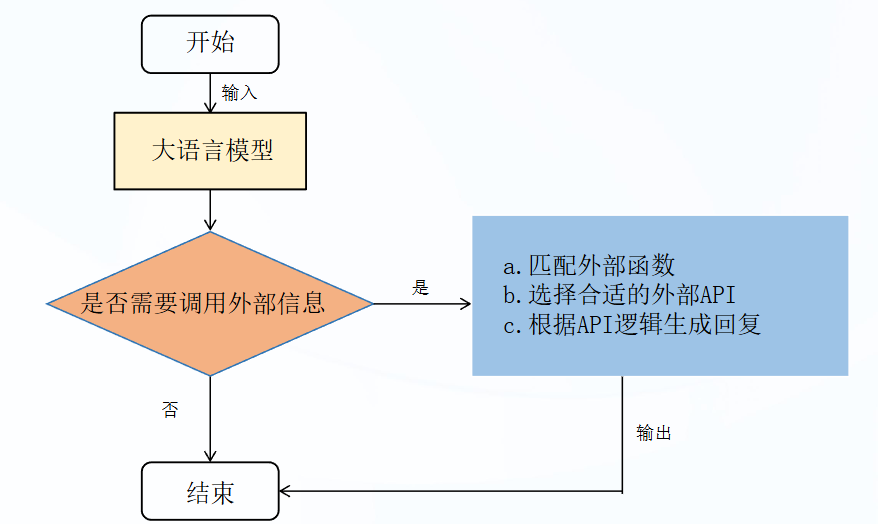
Function Call 可以解决:
- 信息实时性:大模型训练的数据集无法包含最新的信息,如最新的新闻、实时股价等。通过Function Call,模型可以实时获取最新数据,提供更加时效的服务。
- 数据局限性:模型训练数据虽多但有限,无法覆盖所有领域,如医学、法律等领域的专业咨询,Function Call允许模型调用外部数据库或API,获取特定领域的详细信息。
- 功能扩展性:大模型虽然功能强大,但不可能内置所有可能需要的功能。通过FunctionCall,可以轻松扩展模型能力,如调用外部工具进行复杂计算、数据分析等。
原理
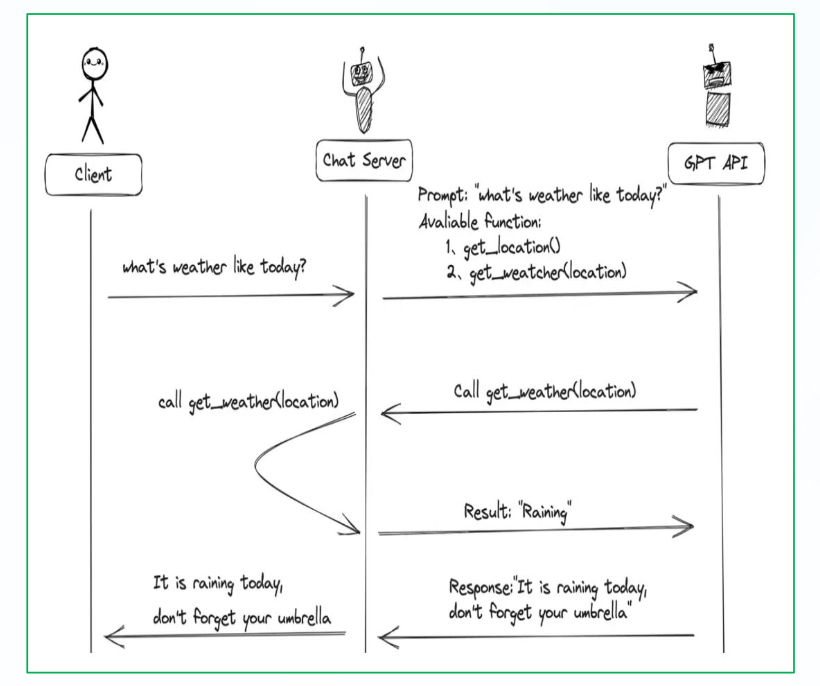
- 用户(Client)发请求prompt以及functions给我们的服务(Chat Server)。
- GPT模型根据用户的prompt,判断是用普通文本还是格式响应我们的服务格式响应我们的服务(Chat Server)。
- 如果是函数调用格式,那么Chat Server就会执行这个函数,并且将结果返回给GPT模型。
- 然后模型使用提供的数据,用连贯的文本响应。返回给用户。
单一函数应用
首先模型需要支持 Function Call。
国内外支持Function Call的模型,如:ChatGPT、百度文心一言,智谱ChatGLM3、讯飞星火3.0等。
定义待调用函数:
def get_current_weather(location):
    """获取指定位置的当前天气"""
    # 用示例数据替代
    return {"location": location, "temperature": "25℃", "weather": "晴"}
然后我们需要定义一个描述函数的列表,具体格式:
| 字段 | 类型 | 是否必填 | 参数说明 |
|---|---|---|---|
| type | String | 是 | 设置为function |
| function | Object | 是 | 函数调用对象 |
| function.name | String | 是 | 函数名称 |
| function.description | String | 是 | 用于描述函数功能,模型会根据这段描述决定函数调用方式 |
| function.parameters | Object | 是 | parameters 字段需要传入一个json Schema 对象,以准确地定义函数所接受的参数。若调用函数不需要传入参数时,省略该参数即可。 |
| required | 否 | 指定哪些参数是必填的 |
例:
tools = [
    {
        "type": "function",
        "function": {
            "name": "get_current_weather",
            "description": "获取给定位置的当前天气",
            "parameters": {
                "type": "object",
                "properties": {
                    "location": {
                        "type": "string",
                        "description": "城市或区,例如北京、海淀",
                    },
                },
                "required": ["location"],
            },
        }
    }
]
我们定义主逻辑,这里以通义千问2.5为例:
import os
from dotenv import load_dotenv, find_dotenv
from tools import *
from zhipuai import ZhipuAI
_ = load_dotenv(find_dotenv())  # 读取.env文件,存储到环境变量中
zhupu_ak = os.environ['zhipu_api']

# 定义 ChatGLM 模型的客户端
client = ZhipuAI(api_key=zhupu_ak) # 填写您自己的APIKey
ChatGLM = "glm-4"


def chat_completion_request(messages, tools=None, tool_choice=None, model=ChatGLM):
    try:
        # 使用客户端对象发送消息,返回值的数据格式是客户端定义的
        response = client.chat.completions.create(
            model=model,
            messages=messages,
            tools=tools,
            tool_choice=tool_choice,
        )
        return response
    except Exception as e:
        print("Unable to generate ChatCompletion response")
        print(f"Exception: {e}")
        return e


def main():
    messages = []
    messages.append({"role": "system",
                     "content": "你是一个天气播报小助手,你需要根据用户提供的地址来回答当地的天气情况,如果用户提供的问题具有不确定性,不要自己编造内容,提示用户明确输入"})
    messages.append({"role": "user", "content": "今天北京的天气如何"})
    print(messages)
    response = chat_completion_request(
        messages, tools=tools, tool_choice="auto"
    )
    # 获取函数的结果
    function_response = parse_response(response)
    # 添加第一次模型得到的结果
    assistant_message = response.choices[0].message
    print(f'assistant_message-->{assistant_message}')
    messages.append(assistant_message.model_dump())  # extend conversation with assistant's reply
    function_name = response.choices[0].message.tool_calls[0].function.name
    print(f'function_name--》{function_name}')
    function_id = response.choices[0].message.tool_calls[0].id
    print(f'function_id--》{function_id}')
    # 添加函数返回的结果
    messages.append(
        {
            "role": "tool",
            "tool_call_id": function_id,
            "name": function_name,
            "content": function_response,
        }

    )  # extend conversation with function response
    last_response = chat_completion_request(
        messages, tools=tools, tool_choice="auto"
    )
    print(f'last_response--》{last_response.choices[0].message}')


if __name__ == '__main__':
    main()
然后我们需要定义一个解析函数返回消息的函数,用于决定是否调用函数。
def parse_response(response):
    #根据模型回复来确定是否调用工具函数,如果调用返回函数的结果
    response_message = response.choices[0].message
    # 根据模型的response内容,检测是否需要调用函数
    if response_message.tool_calls:
        # 调用函数
        available_functions = { "get_current_weather": get_current_weather}  # 这里我们定义了
一个函数,也可以定义多个选择
        function_name = response_message.tool_calls[0].function.name # 从模型回复中获得函数名
        fuction_to_call = available_functions[function_name]
        function_args = json.loads(response_message.tool_calls[0].function.arguments)
        function_response = fuction_to_call(
            location=function_args.get("location"),)
        return function_response
Ollama 版本:
from ollama import chat

# 本地函数
def get_weather(city: str) -> str:
    """获取天气"""

    weather_data = {
        "北京": "晴天 25℃",
        "上海": "小雨 22℃",
        "深圳": "多云 30℃"
    }

    return weather_data.get(city, "未知城市")


# 对话消息
messages = [
    {
        "role": "user",
        "content": "北京天气怎么样"
    }
]

# 调用模型
response = chat(
    model="qwen2.5:7b",
    messages=messages,
    tools=[get_weather]
)

print("模型原始返回:")
print(response)

# 取出 tool calls
tool_calls = response.message.tool_calls

if tool_calls:

    for tool in tool_calls:

        function_name = tool.function.name
        arguments = tool.function.arguments

        print("\n函数名:", function_name)
        print("参数:", arguments)

        # 执行本地函数
        result = get_weather(**arguments)

        print("函数结果:", result)

        # 把 assistant 的 tool call 加入上下文
        messages.append(response.message)

        # tool 结果返回给模型
        messages.append({
            "role": "tool",
            "tool_name": function_name,
            "content": result
        })

# 第二轮生成自然语言回答
final_response = chat(
    model="qwen2.5:7b",
    messages=messages
)

print("\n最终回答:")
print(final_response.message.content)
llm.invoke(messages, tools, ...): 绑定方式:这是一种临时、一次性的绑定方式。我们直接在 invoke 方法中传递 tools 参数,工具仅对本次调用有效。 调用方式:如果你想再次调用模型并使用工具,你必须在下一次 invoke 方法中传递 tools 参数。 适用场景:简单、单次的工具调用需求。
多个函数应用
在真实业务中,通常不会只有一个函数。例如:
- 查询天气
- 查询股票
- 查询快递
- 查询数据库
- 调用搜索引擎
这些都可能同时存在。
因此,大模型需要具备“根据用户问题自动选择工具”的能力,这也是 Function Call 的核心价值之一。
下面以“天气查询 + 时间查询”两个函数为例进行说明。
定义多个函数:
import json
from ollama import chat


# 查询天气
def get_weather(city: str) -> str:
    """获取指定城市天气"""

    weather_data = {
        "北京": "晴天 25℃",
        "上海": "小雨 22℃",
        "深圳": "多云 30℃"
    }

    return weather_data.get(city, "未知城市")


# 查询时间
def get_time(city: str) -> str:
    """获取指定城市时间"""

    time_data = {
        "北京": "2026-05-29 20:00",
        "上海": "2026-05-29 20:00",
        "纽约": "2026-05-29 08:00"
    }

    return time_data.get(city, "未知城市")


# 工具映射表
available_functions = {
    "get_weather": get_weather,
    "get_time": get_time
}


messages = [
    {
        "role": "user",
        "content": "帮我查询北京天气和当前时间"
    }
]


# 第一次请求模型
response = chat(
    model="qwen2.5:7b",
    messages=messages,
    tools=[get_weather, get_time]
)

print("模型首次返回:")
print(response)

tool_calls = response.message.tool_calls


# 判断模型是否调用工具
if tool_calls:

    # 保存 assistant 消息
    messages.append(response.message)

    # 遍历所有工具调用
    for tool in tool_calls:

        function_name = tool.function.name
        function_args = tool.function.arguments

        print(f"\n调用函数: {function_name}")
        print(f"参数: {function_args}")

        # 获取对应函数
        function_to_call = available_functions[function_name]

        # 执行函数
        function_response = function_to_call(**function_args)

        print(f"函数结果: {function_response}")

        # 把工具执行结果返回给模型
        messages.append({
            "role": "tool",
            "tool_name": function_name,
            "content": function_response
        })


# 第二次请求模型
final_response = chat(
    model="qwen2.5:7b",
    messages=messages
)

print("\n最终回答:")
print(final_response.message.content)
运行流程:
用户问题
↓
模型分析问题
↓
决定调用哪些函数
↓
返回多个 tool_calls
↓
Python 执行对应函数
↓
将函数结果回传模型
↓
模型生成最终自然语言答案
多个函数调用时,模型返回的数据结构通常如下:
{
  "tool_calls": [
    {
      "function": {
        "name": "get_weather",
        "arguments": {
          "city": "北京"
        }
      }
    },
    {
      "function": {
        "name": "get_time",
        "arguments": {
          "city": "北京"
        }
      }
    }
  ]
}
因此在代码中通常需要:
for tool in tool_calls:遍历所有函数调用。
使用 tool 装饰器
定义方式:用 langchain_core.tools.tool 装饰器直接装饰一个普通的 Python 函数。
原理:tool 装饰器会自动根据函数的签名(如 a: int, b: int)和文档字符串生成一个完整的工具定义,包括工具名称、描述和参数结构。
from langchain_core.tools import tool
from langchain_ollama import ChatOllama


@tool
def multiply(a: int, b: int) -> int:
    """
    两个数相乘
    """
    return a * b


@tool
def add(a: int, b: int) -> int:
    """
    两个数相加
    """
    return a + b


if __name__ == "__main__":
    # 初始化 Ollama 模型
    llm = ChatOllama(
        model="qwen2.5-7b",
        temperature=0
    )

    # 将工具绑定到 LLM
    tools = [multiply, add]
    llm_with_tools = llm.bind_tools(tools)

    # 提问1:乘法
    print("=" * 50)
    print("提问: 125 乘以 27 等于多少?")
    print("=" * 50)

    response = llm_with_tools.invoke("125 乘以 27 等于多少?")

    if response.tool_calls:
        for tool_call in response.tool_calls:
            tool_name = tool_call['name']
            tool_args = tool_call['args']

            print(f"\n模型决定调用工具: {tool_name}")
            print(f"参数: {tool_args}")

            # 执行对应的工具
            if tool_name == "multiply":
                result = multiply.invoke(tool_args)
                print(f"结果: {result}")
            elif tool_name == "add":
                result = add.invoke(tool_args)
                print(f"结果: {result}")

    # 提问2:加法
    print("\n" + "=" * 50)
    print("提问: 456 加上 789 等于多少?")
    print("=" * 50)

    response = llm_with_tools.invoke("456 加上 789 等于多少?")

    if response.tool_calls:
        for tool_call in response.tool_calls:
            tool_name = tool_call['name']
            tool_args = tool_call['args']

            print(f"\n模型决定调用工具: {tool_name}")
            print(f"参数: {tool_args}")

            if tool_name == "multiply":
                result = multiply.invoke(tool_args)
                print(f"结果: {result}")
            elif tool_name == "add":
                result = add.invoke(tool_args)
                print(f"结果: {result}")

    # 提问3:混合运算
    print("\n" + "=" * 50)
    print("提问: 先计算 15 乘以 4,然后加上 100,结果是多少?")
    print("=" * 50)

    response = llm_with_tools.invoke("先计算 15 乘以 4,然后加上 100,结果是多少?")

    if response.tool_calls:
        for tool_call in response.tool_calls:
            tool_name = tool_call['name']
            tool_args = tool_call['args']

            print(f"\n模型决定调用工具: {tool_name}")
            print(f"参数: {tool_args}")

            if tool_name == "multiply":
                result = multiply.invoke(tool_args)
                print(f"结果: {result}")
            elif tool_name == "add":
                result = add.invoke(tool_args)
                print(f"结果: {result}")
llm.bind_tools(...):绑定方式:这是一个预处理步骤,它将工具列表 tools 永久地绑定到一个新的 Runnable 中,如 llm_with_tools。 调用方式:之后,你只需要对这个新的 Runnable 对象(如 llm_with_tools)调用
invoke方法,无需再次传递工具参数。 这是 Langchain 的推荐做法,特别是在构建复杂的调用链(chain)或 Agent 时。它将模型和工具封装在一起,使整个工作流更模块化、更清晰。特点是可以反复使用 llm_with_tools 对象,而不需要每次绑定工具。
使用 Pydantic
定义方式:创建一个继承自 BaseModel 的类,用类型注解和 Field 定义工具的参数。同时,需要在类中手动实现一个 invoke 方法来包含工具的执行逻辑。
工作原理:
- 数据验证:Pydantic 提供了强大的数据验证功能。当工具被调用时,它会自动验证传入的参数是否符合你在 BaseModel 中定义的类型和约束。
- 手动实现:与 @tool 不同,Pydantic 本身不提供工具的执行逻辑。因此,你必须显式地编写 invoke 方法来处理参数并返回结果。
优势:
- 强大的数据验证:Pydantic 提供了比 @tool 更细粒度和更丰富的参数验证功能,可以定义更复杂的约束。
- 高度可控:由于 invoke 方法是手动实现的,你可以完全控制工具的执行逻辑,例如添加复杂的预处理、错误处理或自定义逻辑。
- 清晰的结构:工具的参数定义和执行逻辑被封装在一个类中,使得代码结构更加清晰。
from langchain_core.tools import StructuredTool
from langchain_ollama import ChatOllama
from pydantic import BaseModel, Field


class MultiplyInput(BaseModel):
    """乘法工具的输入参数"""
    a: int = Field(description="第一个乘数")
    b: int = Field(description="第二个乘数")


class AddInput(BaseModel):
    """加法工具的输入参数"""
    a: int = Field(description="第一个加数")
    b: int = Field(description="第二个加数")


def multiply(a: int, b: int) -> int:
    """两个数相乘"""
    return a * b


def add(a: int, b: int) -> int:
    """两个数相加"""
    return a + b


# 使用 Pydantic 模型创建结构化工具
multiply_tool = StructuredTool.from_function(
    func=multiply,
    name="multiply",
    description="两个数相乘",
    args_schema=MultiplyInput
)

add_tool = StructuredTool.from_function(
    func=add,
    name="add",
    description="两个数相加",
    args_schema=AddInput
)


if __name__ == "__main__":
    # 初始化 Ollama 模型
    llm = ChatOllama(
        model="qwen2.5:7b",
        temperature=0
    )

    # 将工具绑定到 LLM
    tools = [multiply_tool, add_tool]
    llm_with_tools = llm.bind_tools(tools)

    # 提问1:乘法
    print("=" * 50)
    print("提问: 125 乘以 27 等于多少?")
    print("=" * 50)

    response = llm_with_tools.invoke("125 乘以 27 等于多少?")

    if response.tool_calls:
        for tool_call in response.tool_calls:
            tool_name = tool_call['name']
            tool_args = tool_call['args']

            print(f"\n模型决定调用工具: {tool_name}")
            print(f"参数: {tool_args}")

            # 执行对应的工具
            if tool_name == "multiply":
                result = multiply_tool.invoke(tool_args)
                print(f"结果: {result}")
            elif tool_name == "add":
                result = add_tool.invoke(tool_args)
                print(f"结果: {result}")

    # 提问2:加法
    print("\n" + "=" * 50)
    print("提问: 456 加上 789 等于多少?")
    print("=" * 50)

    response = llm_with_tools.invoke("456 加上 789 等于多少?")

    if response.tool_calls:
        for tool_call in response.tool_calls:
            tool_name = tool_call['name']
            tool_args = tool_call['args']

            print(f"\n模型决定调用工具: {tool_name}")
            print(f"参数: {tool_args}")

            if tool_name == "multiply":
                result = multiply_tool.invoke(tool_args)
                print(f"结果: {result}")
            elif tool_name == "add":
                result = add_tool.invoke(tool_args)
                print(f"结果: {result}")

    # 提问3:混合运算
    print("\n" + "=" * 50)
    print("提问: 先计算 15 乘以 4,然后加上 100,结果是多少?")
    print("=" * 50)

    response = llm_with_tools.invoke("先计算 15 乘以 4,然后加上 100,结果是多少?")

    if response.tool_calls:
        for tool_call in response.tool_calls:
            tool_name = tool_call['name']
            tool_args = tool_call['args']

            print(f"\n模型决定调用工具: {tool_name}")
            print(f"参数: {tool_args}")

            if tool_name == "multiply":
                result = multiply_tool.invoke(tool_args)
                print(f"结果: {result}")
            elif tool_name == "add":
                result = add_tool.invoke(tool_args)
print(f"结果: {result}")| 特性 | @tool 装饰器(tool@ toolDefine.py) | Pydantic(pydantic_toolDefine.py) | JSON Schema(toolJson_toolDefine.py) |
|---|---|---|---|
| 定义方式 | 装饰 Python 函数 | 继承 Pydantic BaseModel | 手动编写 Python 字典(JSON Schema) |
| 自动化程度 | 高:自动生成 Schema 和调用逻辑 | 中等:自动验证数据,但需手动实现 invoke | 低:完全手动定义和分发 |
| 数据验证 | 基础类型检查 | 强大:提供丰富的验证功能 | 需要手动验证或依赖外部库 |
| 适用场景 | 快速开发、简单工具、原型验证 | 需要复杂数据验证、清晰结构和自定义逻辑的场景 | 需要与其他系统集成、通用性和最大灵活性的场景 |